Riptide Value Manager
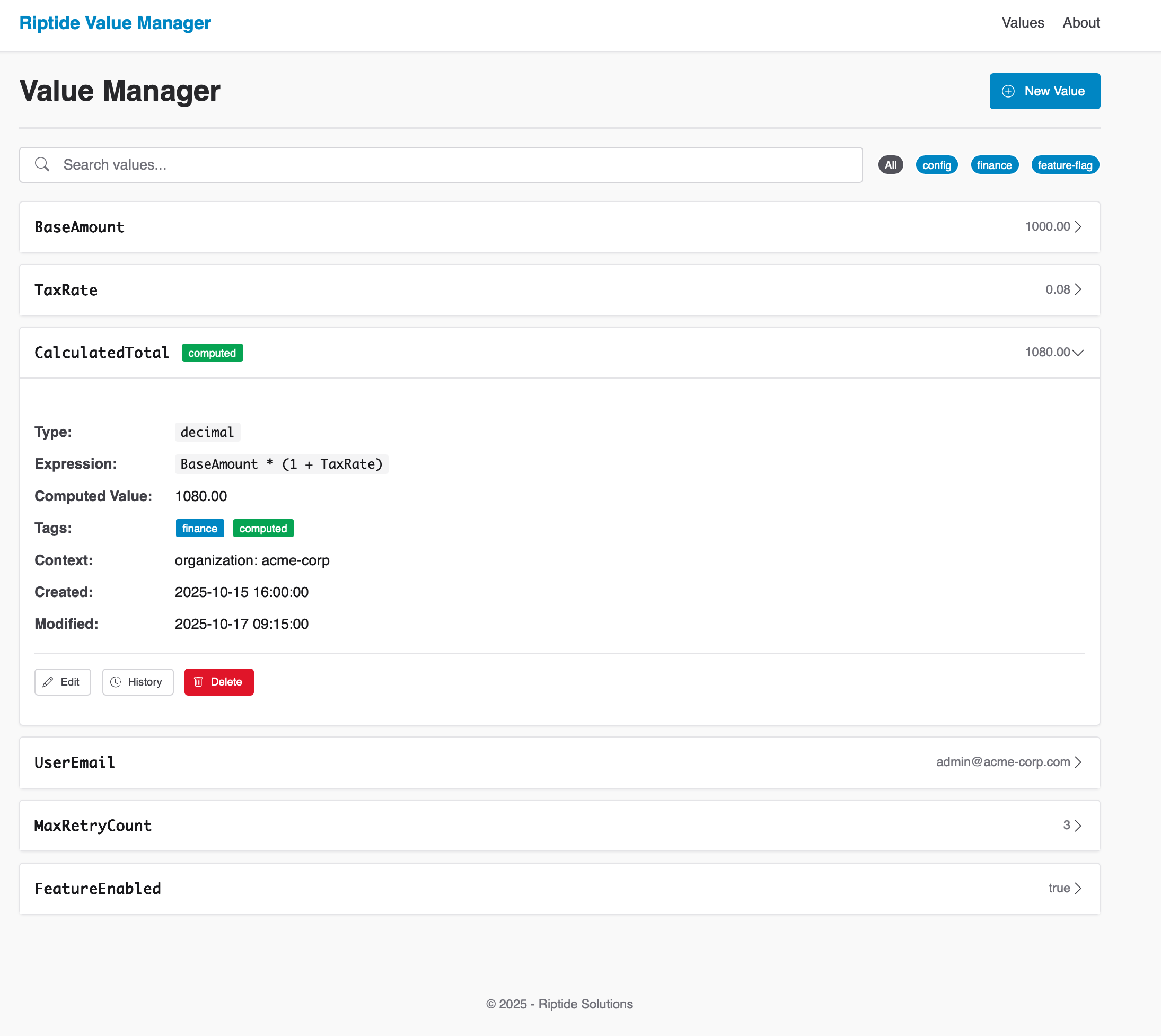
Overview
Riptide Value Manager is an enterprise-grade system for centralized management of typed variables used across business applications. It provides a business-user interface that enables non-technical users to update configuration values, business rules parameters, and application settings without code changes or developer intervention—dramatically reducing time-to-market for business logic adjustments and eliminating deployment risks for simple value changes.
Purpose
Modern enterprise applications require dynamic configuration without code deployments. Value Manager solves this by:
- Providing a central repository for all application variables
- Supporting different value types (strings, numbers, booleans, dates)
- Enabling business users to manage these values directly
- Supporting computed expressions for derived values
- Maintaining hierarchical context for value resolution
Why Riptide Value Manager
Empowers Business Users: Non-technical staff can update configuration values, business rules, and parameters directly through an intuitive interface—eliminating the bottleneck of waiting for developer availability and code deployments.
Accelerates Time-to-Market: Changes that previously required development sprints, code reviews, testing, and deployment cycles can now be made in minutes by the people who understand the business requirements best.
Reduces Risk: Simple value changes no longer require code deployments, eliminating the risk of deployment failures, rollback procedures, and production incidents for routine configuration updates.
Increases Developer Productivity: Developers focus on building features instead of making configuration changes, while business users maintain direct control over the parameters that drive application behavior.
Ensures Compliance: Complete audit trails track every change with user identity and timestamps. Optional workflow integration adds approval gates for sensitive changes, satisfying regulatory and governance requirements.
Delivers Enterprise Scale: Role-based access control, multi-tenant support, and hierarchical value resolution ensure the system scales from departmental use to enterprise-wide deployment while maintaining security and performance.
Key Capabilities
- Strongly-typed Values: Define string, number, boolean, or datetime values with comprehensive validation and automatic type conversion
- Enterprise Expression Engine: Roslyn-based C# scripting enables sophisticated calculated values with full .NET language capabilities—arithmetic, conditional logic, string manipulation, and Math functions
- Context-aware Resolution: Values automatically resolve with hierarchical fallback (user → project → organization → global) for precise, scalable configuration
- Hierarchical Fallback: Intelligent resolution engine automatically finds the most specific value for any context while preventing infinite recursion
- Complete Audit Trail: Comprehensive change tracking with user identity, timestamps, and value history for regulatory compliance
- Capability-Based Access Control: Advanced authorization system with fine-grained permissions and Riptide Identity integration
- Excel Import/Export: Full-featured bulk operations with validation and error reporting for business-user workflow integration
Expression System
Riptide Value Manager supports computed values through a powerful expression system powered by Microsoft Roslyn. This allows you to define values that are dynamically calculated based on other values, constants, or mathematical operations using full C# syntax.
Basic Syntax
Expressions use C#-based syntax through Roslyn scripting. Reference other values using the Values.PropertyName format:
// Reference another value
Values.BaseAmount

// Simple arithmetic
Values.BaseAmount * 0.2

// Multiple value references
Values.BaseAmount * Values.TaxRate
Value References
To reference another value in the system:
- Use the
Values.prefix followed by the exact name of the value - Names are case-sensitive in expressions (use exactly as shown in the UI)
- The system will resolve the referenced value based on the current context
Supported Operations
Arithmetic Operations
Values.BaseAmount + Values.AdditionalFee  // Addition
Values.BaseAmount - Values.Discount       // Subtraction
Values.BaseAmount * Values.Multiplier     // Multiplication
Values.BaseAmount / Values.Divisor        // Division
Math.Pow(Values.BaseAmount, 2)            // Exponentiation
Comparison Operations
Values.Amount > Values.Threshold           // Greater than
Values.Amount >= Values.Threshold          // Greater than or equal
Values.Amount < Values.Threshold           // Less than
Values.Amount <= Values.Threshold          // Less than or equal
Values.Amount == Values.ExpectedValue      // Equal to
Values.Amount != Values.ExpectedValue      // Not equal to
Conditional Expressions
Values.Amount > 1000 ? Values.HighTier : Values.LowTier // Ternary conditional
Math Functions
Math.Round(Values.Amount, 2)               // Round to 2 decimal places
Math.Ceiling(Values.Amount)                // Round up to nearest integer
Math.Floor(Values.Amount)                  // Round down to nearest integer
Math.Abs(Values.Amount)                    // Absolute value
Math.Min(Values.Amount1, Values.Amount2)   // Minimum of two values
Math.Max(Values.Amount1, Values.Amount2)   // Maximum of two values
String Operations
Values.Prefix + " " + Values.Suffix        // String concatenation
Values.Text.ToUpper()                      // Convert to uppercase
Values.Text.ToLower()                      // Convert to lowercase
Values.Text.Substring(0, 5)                // Get first 5 characters
Values.Text.Replace("old", "new")          // Replace text
Values.Text.Contains("search")             // Check if contains text
DateTime Operations
Values.StartDate.AddDays(Values.DayCount)     // Date arithmetic
Values.StartDate.AddMonths(Values.MonthCount)
Values.Date.Year                              // Date parts
Values.Date.Month
Values.Date.Day
(Values.EndDate - Values.StartDate).TotalDays // Date differences
Expression Examples
Tiered Pricing Calculation
Values.Quantity < 10 ? Values.BasePrice :
Values.Quantity < 50 ? Values.BasePrice * 0.9 :
Values.BasePrice * 0.8
Tax Calculation with Rounding
Math.Round(Values.SubTotal * Values.TaxRate, 2)
Date-based Promotion
DateTime.Now >= Values.PromotionStart && DateTime.Now <= Values.PromotionEnd ?
    Values.DiscountedPrice : Values.RegularPrice
Best Practices & Limitations
Best Practices:
- Keep expressions simple and avoid deep nesting
- Use parentheses for clarity in complex expressions
- Check for division by zero:
Values.Divisor != 0 ? Values.Amount / Values.Divisor : 0 - Follow descriptive naming conventions for referenced values
Limitations:
- Maximum recursion depth to prevent infinite loops
- Complex expressions with many value references may impact performance
- Not all C# language features are supported in expressions
Integration Points
- Comprehensive REST API: Full CRUD operations with OpenAPI documentation, JWT authentication, and API key support for read-only access
- High-Performance Resolver: Asynchronous value resolution with intelligent caching and context-aware lookups
- .NET SDK: Strongly-typed client library with async/await patterns and comprehensive error handling
- Riptide Identity Integration: Seamless authentication with capability-based authorization and role management
- Excel Integration: Native import/export with validation, error reporting, and business-user-friendly formatting
- Modern Web Interface: Responsive design with inline editing, real-time validation, and mobile-responsive access
Common Use Cases
- Feature Flags: Toggle features on/off without code deployments
- Business Rules: Store thresholds, rates, and parameters for rule engines
- Content Personalization: Store segments, targeting criteria, and content variants
- Workflow Configuration: Define process parameters and transition conditions
- Prompt Engineering: Store reusable components for LLM prompt construction