Riptide Platform Architecture
One foundation. Many applications.
Riptide Platform SDK
Overview
The Riptide Platform SDK is an enterprise-grade development framework for .NET 8+ applications that provides a comprehensive suite of foundational services designed to accelerate development while ensuring consistency, reliability, and best practices across your entire application portfolio. It delivers production-ready implementations of cross-cutting concerns that every modern enterprise application requires.
Purpose
Traditional enterprise application development requires teams to repeatedly solve the same fundamental challenges: logging, configuration management, dependency injection, monitoring, multi-tenancy, and testing infrastructure. Riptide Platform SDK solves this by:
- Standardizing Cross-Cutting Concerns: Consistent implementations across all applications
- Accelerating Time-to-Market: Pre-built, tested infrastructure components
- Enforcing Best Practices: Clean architecture patterns built into the framework
- Reducing Technical Debt: Well-documented, maintainable code from day one
- Enabling Enterprise Scale: Multi-tenant, observable, configurable by design
- Simplifying Testing: Comprehensive testing utilities and patterns
Key Capabilities
Production-Ready Infrastructure
- Identity Management: Unified authentication with three deployment modes (Self-Contained, SSO, Application Manager) and capability-based authorization
- Enterprise Logging: Structured logging with correlation tracking, pattern-based masking, and extensible provider support
- Configuration Management: Multi-source configuration with secrets management and value monitoring patterns
- Monitoring Abstraction: Metrics collection with DataDog and OpenTelemetry backend support
- Persistence: Database provider abstraction with EF Core supporting SQLite, PostgreSQL, and SQL Server
- Dependency Injection: Attribute-based service registration with automatic assembly scanning
- Tenant Context Patterns: Foundational abstractions for multi-tenant applications
- Security: Input sanitization, output encoding, and OWASP-aligned protection against XSS, injection, and path traversal
- Documentation: Embeddable markdown documentation viewer with navigation, search, and Mermaid diagrams
- AI Agent Skills: Pre-built skill files and context documents that give AI coding agents deep SDK knowledge for production-ready AI-assisted development
- Testing Patterns: Base classes and examples for unit, integration, and architecture tests
- Cryptographic Licensing: RSA-4096 signature-based license protection with offline validation
Clean Architecture Foundation
- Layered Design: Clear separation between Domain, Application, Infrastructure, and Presentation
- SOLID Principles: Built-in patterns that enforce maintainable, testable code
- Domain-Driven Design: Value objects, entities, and aggregates with validation
- Command Query Separation: Clear patterns for reads vs. writes
- Repository Pattern: Abstracted data access with provider flexibility
Developer Experience
- Minimal Configuration: Convention-over-configuration with sensible defaults
- Fluent APIs: Intuitive, discoverable service configuration
- Rich Documentation: Comprehensive XML documentation and usage examples
- Type Safety: Strong typing throughout with compile-time validation
- IntelliSense Support: Full IDE integration for productivity
- Agentic AI Support: Skill files that enable AI coding assistants to provide accurate, context-aware suggestions based on deep SDK knowledge
Core Components
1. Logging Component
Structured logging framework with Console, File, and DataDog provider support. Includes correlation tracking, pattern-based sensitive data masking, and ASP.NET Core middleware.
Key Features:
- Structured logging with JSON format
- Pattern-based PII masking (email, SSN, credit card formats)
- DataDog provider for sending logs to DataDog Logs API
- External provider framework for Elastic and custom endpoints
- Request/response logging middleware
- Health check integration
2. Configuration Component
Multi-source configuration with Local, Application Manager, Azure Key Vault, and Strongbox providers. Supports file watching and IOptionsMonitor patterns for value reloading.
Key Features:
- Multiple provider support with failover
- Secrets management with Key Vault and Strongbox
- Application Manager integration for centralized configuration
- File watching for configuration value changes
- IOptionsMonitor integration for reactive configuration
- Provider health checks
3. Monitoring Component
Metrics collection abstraction with DataDog and OpenTelemetry provider support. Push metrics to monitoring backends with tenant tagging.
Key Features:
- DataDog and OpenTelemetry providers
- In-memory provider for testing
- Tenant tagging for metrics
- Monitoring attributes (
[TrackMetrics],[MonitorPerformance]) - Health check integration
4. Dependency Injection Component
Attribute-based service registration using [AutoRegister] with automatic assembly scanning and lifecycle management.
Key Features:
[AutoRegister]attribute for declarative registration- Assembly scanning and service discovery
- Multiple interface registration
- Keyed services and service replacement
- Tenant context middleware integration
5. Tenant Isolation Component
Foundational abstractions for multi-tenant applications including domain models, interfaces, and row-level isolation patterns.
Key Features:
- Tenant domain value objects and entities
[RequiresTenant]attribute- ASP.NET Core middleware foundation
- EF Core query filter patterns and examples
- Extensible tenant resolver interfaces
6. Testing Component
Base classes and patterns for testing clean architecture applications with examples for architecture tests, builders, and integration testing.
Key Features:
- Unit and integration test base classes
- Architecture test examples (NetArchTest patterns)
- Builder pattern documentation
- In-memory provider implementations
- Health check testing utilities
- Integration test helpers
- Mock data generation
7. Identity Management Component
Unified authentication framework supporting three deployment models: Self-Contained identity, SSO integration, and Application Manager. Switch between modes with configuration changes—no code modifications required.
Key Features:
- Three identity modes: Self-Contained, Single Sign-On, and Application Manager
- Self-contained mode with BCrypt password hashing and JWT tokens
- SSO integration with Azure Entra ID (extensible to Google, Okta, etc.)
- Application Manager integration with centralized identity brokering and capability-based authorization
- Multi-database support (SQLite, PostgreSQL, SQL Server)
- Configuration-based mode switching
- Declarative capability authorization with custom attributes
- Multi-tenancy support with trial management
- Session management with refresh tokens
- Account lockout and security features
Identity Modes:
Self-Contained: Complete embedded identity system with local user storage, perfect for standalone deployments, edge computing, and air-gapped environments. Ships with default admin user and provides full user management.
Single Sign-On (SSO): OAuth2/OIDC integration with enterprise identity providers. Plugin architecture supports Azure Entra ID out-of-the-box with extensibility for additional providers. Optional group-based access restrictions.
Application Manager: Centralized identity brokering and authorization for multi-application deployments. Federates authentication across enterprise SSO, public IdPs, local passwords, and trial tokens. Provides role-based access control with granular capability definitions, trial management, and automatic tenant provisioning.
8. Licensing Component
Enterprise-grade RSA-4096 cryptographic licensing system for protecting your applications with offline license validation. Generate tamper-proof license tokens without requiring online activation or phone-home functionality.
Key Features:
- RSA-4096 digital signature-based licensing
- Offline license validation (no phone-home required)
- Tamper-proof license tokens with cryptographic verification
- Extensible license model for custom applications
- LicenseGenerator CLI tool for development and production licenses
- Comprehensive key management and security documentation
- InstallationId binding to prevent license sharing
- Support for perpetual and time-limited licenses
9. Security Component
OWASP-aligned input sanitization, output encoding, and protection against common web vulnerabilities including XSS, SQL injection, command injection, and path traversal.
Key Features:
- Input sanitization engine with configurable strictness levels
- HTML encoding, JavaScript encoding, and URL encoding utilities
- SQL injection pattern detection and prevention
- Command injection and path traversal protection
- Configurable allow/deny lists for input validation
- ASP.NET Core middleware integration
- Audit logging of security events
10. Documentation Component
Embeddable documentation viewer that renders markdown files as a browsable microsite with automatic navigation, full-text search, and Mermaid diagram support.
Key Features:
- Markdown rendering with Markdig advanced extensions
- Automatic navigation tree from filesystem or toc.json manifest
- Full-text search with in-memory indexing and highlighted snippets
- Mermaid diagram support for architecture and flow diagrams
- HTMX-powered page transitions without full reloads
- Responsive layout with collapsible sidebar
- Application Manager integration for documentation portal architecture
11. AI Agent Skills
Pre-built skill files and context documents that give AI coding agents—Claude, GitHub Copilot, and others—deep knowledge of the Riptide Platform SDK. Instead of discovering APIs through trial and error, AI assistants start every session with the correct middleware pipeline order, component registration sequences, interface references, and architecture patterns.
Key Features:
- Claude Code skill (SKILL.md) with critical rules, interface quick reference, and namespace mappings
- Complete component API reference covering registration, middleware, and usage for all SDK components
- Configuration reference with full appsettings.json structure and per-component options
- Annotated code examples for common integration scenarios
- AI-AGENT-CONTEXT.md quick-start document for non-specific agents and IDE assistants
- Zero runtime overhead—skill files ship alongside the SDK and are consumed only by AI tooling
Integration Points
ASP.NET Core Integration
- Middleware for logging, monitoring, and tenant resolution
- Health check endpoints with detailed diagnostics
- Service registration extensions
- Configuration binding
- Request/response pipeline integration
API Integration
- RESTful service patterns
- OpenAPI/Swagger documentation
- Versioned API support
- CORS configuration
- Rate limiting and throttling
Database Integration
- Repository pattern implementations
- Entity Framework Core integration
- Multi-tenant data isolation
- Migration management
- Connection resilience
Cloud Platform Support
- Azure App Configuration integration
- Azure Key Vault for secrets
- Azure Application Insights monitoring
- Container orchestration (Kubernetes, Docker)
- CI/CD pipeline templates
Common Use Cases
Microservices Development
Build consistent microservices with standardized logging, monitoring, and configuration across your service mesh. Tenant context automatically propagates through service calls, and distributed tracing provides end-to-end visibility.
Multi-Tenant SaaS Applications
Develop SaaS applications with built-in tenant isolation, tenant-aware configuration, and per-tenant monitoring. Scale from single-tenant to enterprise multi-tenant deployments without code changes.
Enterprise Application Modernization
Migrate legacy applications to modern .NET with a proven framework that provides enterprise-grade infrastructure. Standardize across your application portfolio while maintaining consistency.
Rapid Prototyping and MVP Development
Accelerate time-to-market by focusing on business logic while the SDK handles infrastructure concerns. Production-ready from day one with built-in observability and configurability.
High-Compliance Environments
Support regulatory programs (SOC 2, HIPAA, GDPR) with audit logging hooks, data masking helpers, tenant isolation, and extensible monitoring. Each component provides building blocks you can tailor to your policies.
Technical Specifications
- Platform: .NET 8+ with C# 12+
- Architecture: Clean Architecture with Domain-Driven Design
- Testing: xUnit with FluentAssertions and Moq
- Documentation: Comprehensive XML documentation with full IntelliSense support
- Dependencies: Minimal external dependencies, extensible providers
- Packaging: NuGet packages for modular adoption
- Support: Enterprise support options available
Why Riptide Platform SDK
Business Value
- Faster Development: Pre-built infrastructure components eliminate months of foundational work
- Reduced Technical Debt: Clean architecture patterns prevent common pitfalls
- Lower Maintenance Costs: Well-tested, documented code requires less ongoing effort
- Faster Onboarding: New developers productive immediately with familiar patterns
- Risk Mitigation: Battle-tested components reduce production incidents
Technical Excellence
- Full IntelliSense Support: Complete XML documentation enables rich IDE integration
- Comprehensive Test Coverage: Unit, integration, and architecture tests
- Clean Architecture: SOLID principles throughout
- Performance Optimized: Efficient implementations with minimal overhead
- Extensibility: Provider pattern allows customization without forking
Enterprise Ready
- Multi-Tenant Native: Built for SaaS from the ground up
- Observable: Comprehensive logging and monitoring
- Secure: Built-in secrets management and data masking
- Scalable: Designed for high-throughput scenarios
- Compliance-Friendly: Audit trail and retention building blocks ready for extension
Support & Resources
- Active Development: Regular updates and improvements
- Comprehensive Documentation: API docs, guides, and examples
- Sample Applications: Real-world reference implementations
- Best Practices: Proven patterns and anti-pattern guidance
- Enterprise Support: Professional support options available
Getting Started
Quick Start
// Program.cs
var builder = WebApplication.CreateBuilder(args);

// Add Riptide Platform services
builder.Services
    .AddRiptideIdentity(builder.Configuration)
    .AddRiptideLogging(options => options.UseConsole().UseFile())
    .AddRiptideConfiguration(options => options.UseLocalDevelopment())
    .AddRiptideMonitoring(options => options.UseDataDog())
    .AddRiptideDependencyInjection()
    .AddRiptideTenantIsolation();

var app = builder.Build();

// Add Riptide middleware
app.UseAuthentication()
   .UseAuthorization()
   .UseRiptideLogging()
   .UseRiptideTenantResolution()
   .UseRiptideMonitoring();

app.Run();
Installation
For the simplest onboarding, install the unified SDK meta-package:
dotnet add package Riptide.Platform.SDK
If you prefer to adopt components one at a time, install the Bootstrap packages individually:
dotnet add package Riptide.Platform.Identity.Bootstrap
dotnet add package Riptide.Platform.Logging.Bootstrap
dotnet add package Riptide.Platform.Configuration.Bootstrap
dotnet add package Riptide.Platform.Monitoring.Bootstrap
dotnet add package Riptide.Platform.Persistence.Bootstrap
dotnet add package Riptide.Platform.DependencyInjection.Bootstrap
dotnet add package Riptide.Platform.TenantIsolation.Bootstrap
dotnet add package Riptide.Platform.Security.Bootstrap
dotnet add package Riptide.Platform.Documentation.Bootstrap
dotnet add package Riptide.Platform.Testing.Bootstrap
# AI Agent Skills are included automatically—no package install required
dotnet add package Riptide.Platform.Licensing
Identity Management Setup
Configure your application's identity mode based on deployment requirements:
// Self-Contained Mode (appsettings.json)
{
  "Identity": {
    "Mode": "SelfContained",
    "SelfContained": {
      "DatabaseProvider": "SQLite",
      "ConnectionString": "Data Source=identity.db",
      "JwtSecretKey": "#{JWT_SECRET_KEY}#your-secret-key-min-32-chars",
      "CreateDefaultAdmin": true
    }
  }
}

// SSO Mode (appsettings.json)
{
  "Identity": {
    "Mode": "SingleSignOn",
    "Sso": {
      "Provider": "AzureEntraId",
      "ClientId": "#{SSO_CLIENT_ID}#your-client-id",
      "ClientSecret": "#{SSO_CLIENT_SECRET}#your-client-secret",
      "TenantId": "#{SSO_TENANT_ID}#your-tenant-id"
    }
  }
}

// Application Manager Mode with Capabilities (appsettings.json)
{
  "Identity": {
    "Mode": "ApplicationManager",
    "ApplicationManager": {
      "ServerUrl": "https://appmanager.riptide.solutions",
      "ApplicationName": "myapp",
      "ApiKey": "#{APP_MANAGER_API_KEY}#your-api-key",
      "Capabilities": [
        {
          "Code": "myapp:read",
          "Name": "View Data",
          "Description": "Can view application data"
        },
        {
          "Code": "myapp:admin",
          "Name": "Administrator",
          "Description": "Full administrative access"
        }
      ]
    }
  }
}
Use declarative capability-based authorization in your controllers:
[ApiController]
[Route("api/data")]
public class DataController : ControllerBase
{
    [HttpGet]
    [RequireCapability("myapp:read")]
    public async Task<IActionResult> GetData()
    {
        // Capability checked automatically by attribute
        return Ok(data);
    }

    [HttpPost]
    [RequireCapability("myapp:create", "myapp:admin")]
    public async Task<IActionResult> CreateData([FromBody] DataDto data)
    {
        // User must have either capability
        return Ok(result);
    }
}
Licensing Your Application
Protect your application with the SDK's cryptographic licensing system:
// Add licensing to your application
builder.Services.AddRiptideLicensing(options =>
{
    options.Token = builder.Configuration["Riptide:Platform:License:Token"];
    options.InstallationId = builder.Configuration["Riptide:Platform:License:InstallationId"];
});

// For development, use the LicenseGenerator tool:
// cd tools/LicenseGenerator && dotnet run
See the Licensing Component Documentation for detailed information about the cryptographic licensing system, key management, and the LicenseGenerator tool.
Architecture Validation
The SDK includes built-in architecture tests to ensure your application maintains clean architecture principles:
- Layer dependency validation
- Naming convention enforcement
- Test coverage requirements
- Documentation completeness checks
Performance Characteristics
- Designed for Low Overhead: Middleware is tuned to stay lightweight—benchmark in your own environment before going live.
- Logging Pipeline: Asynchronous batching defaults help balance throughput and latency; adjust policies to fit your workload.
- Configuration & Metrics Caching: Reduces redundant lookups while remaining responsive to change notifications.
- Memory Awareness: Hot paths minimize allocations for typical web workloads; validate with your production load tests.
- Scale Guidance: Internal stress tests cover high-throughput scenarios, but plan full performance runs prior to production.
Compliance & Security
- Audit Trail Hooks: Structured logging and change tracking primitives to plug into your compliance workflows.
- Sensitive Data Guardrails: Masking utilities and encryption extension points to align with HIPAA or similar policies.
- Tenant Controls: Isolation patterns and deletion hooks that support GDPR-style data requests.
- Security Foundations: Secrets management helpers and least-privilege defaults that you can extend for your environment.
- Ongoing Updates: Regular dependency updates and vulnerability scanning guidance; review against your internal standards.
Support & Resources
- Documentation: docs/
- Sample Applications: samples/
- API Reference: docs/api/
- Enterprise Support: Contact for professional support options
Riptide Platform SDK - Building enterprise applications the right way, from day one.
SDK Identity Component
Overview
The Riptide SDK Identity Component is an enterprise-grade authentication and authorization framework for .NET 8+ applications that provides secure user management, role-based access control, token-based authentication, and seamless integration with Riptide Application Manager. It enables development teams to implement consistent security across all Riptide platform applications while maintaining flexibility for custom authorization requirements.
Purpose
Modern applications require sophisticated identity management that supports secure authentication, fine-grained authorization, and integration with centralized identity providers. Traditional authentication approaches often result in inconsistent security implementations, duplicated user management logic, and complex integration challenges. Riptide Identity solves this by:
- Centralizing Authentication: Integration with Riptide Application Manager for unified user management
- Standardizing Authorization: Role-based and claims-based access control patterns
- Securing API Access: Token-based authentication with automatic validation
- Supporting Multi-Tenancy: Tenant-aware authentication and authorization
- Enabling SSO: Single sign-on across Riptide platform applications
- Simplifying Integration: Consistent authentication across all services
- Providing Audit Trails: Track authentication events and authorization decisions
Key Capabilities
Authentication Management
- Token-Based Authentication: Support for JWT tokens with automatic validation
- Application Manager Integration: Seamless connection to Riptide Application Manager for user authentication
- Session Management: Secure session handling with configurable expiration
- Password Policies: Configurable password strength and rotation requirements
- Multi-Factor Support: Integration points for MFA providers
- API Key Authentication: Support for service-to-service authentication
Authorization Framework
- Role-Based Access Control: Assign users to roles with specific permissions
- Claims-Based Authorization: Fine-grained permissions based on user claims
- Policy-Based Authorization: Define custom authorization policies
- Resource-Based Authorization: Context-aware permission checks for specific resources
- Tenant Isolation: Automatic enforcement of tenant boundaries
- Permission Caching: Performance-optimized permission lookups
Token Management
- Token Generation: Create authentication tokens with configurable claims
- Token Validation: Automatic validation of token signatures and expiration
- Token Refresh: Support for refresh tokens to maintain sessions
- Token Revocation: Immediate invalidation of compromised tokens
- Scope Management: Define and enforce token scopes for API access
- Audience Validation: Ensure tokens are used for intended services
User Context
- Current User Access: Retrieve authenticated user information throughout request pipeline
- Tenant Context: Automatic tenant identification from authentication context
- Role Membership: Query user roles and permissions
- Claims Access: Read user claims for authorization decisions
- Impersonation Support: Admin users can impersonate other users for support scenarios
- Anonymous Handling: Graceful handling of unauthenticated requests
Integration with Application Manager
- User Synchronization: Keep local user cache synchronized with Application Manager
- Centralized Management: Delegate user administration to Application Manager
- Credential Validation: Validate credentials against Application Manager
- Profile Updates: Propagate user profile changes from Application Manager
- Group Membership: Sync group and role assignments
- Password Resets: Integrate with Application Manager password reset flows
Security Features
- HTTPS Enforcement: Ensure all identity operations use secure connections
- CORS Configuration: Control cross-origin authentication requests
- Rate Limiting: Protect against brute force authentication attempts
- Audit Logging: Track all authentication and authorization events
- Token Encryption: Encrypt sensitive token contents
- Secure Cookie Handling: HttpOnly and Secure flags for authentication cookies
Integration Points
ASP.NET Core
// Startup configuration
builder.Services.AddRiptideIdentity(options =>
{
    options.UseApplicationManager(config =>
    {
        config.Endpoint = "https://appmanager.example.com";
        config.ClientId = "your-application-id";
        config.ClientSecret = configuration["Identity:ClientSecret"];
    });

    options.EnableTokenValidation()
           .EnableRoleBasedAuthorization()
           .EnableAuditLogging();
});

// Middleware
app.UseAuthentication();
app.UseAuthorization();
Authorization Policies
// Define custom policies
builder.Services.AddAuthorization(options =>
{
    options.AddPolicy("RequireAdmin", policy =>
        policy.RequireRole("Admin"));

    options.AddPolicy("RequireManager", policy =>
        policy.RequireClaim("permission", "manage"));
});

// Use in controllers
[Authorize(Policy = "RequireAdmin")]
public class AdminController : ControllerBase
{
    // Admin-only endpoints
}
Accessing User Context
// Inject user context service
public class MyService
{
    private readonly IUserContext _userContext;

    public MyService(IUserContext userContext)
    {
        _userContext = userContext;
    }

    public async Task ProcessRequest()
    {
        var userId = _userContext.UserId;
        var tenantId = _userContext.TenantId;
        var roles = _userContext.Roles;

        if (_userContext.IsInRole("Admin"))
        {
            // Admin-specific logic
        }
    }
}
Common Use Cases
Application Authentication
Integrate Riptide Identity component to authenticate users across platform applications. Users log in once through Application Manager and receive tokens that work across all services. The component validates tokens, extracts user information, and makes it available throughout the request pipeline.
API Authorization
Protect API endpoints with role-based or policy-based authorization. Define authorization requirements at the controller or action level. The component automatically enforces authorization rules and returns appropriate HTTP status codes for unauthorized requests.
Multi-Tenant Security
Automatically enforce tenant isolation by extracting tenant context from authentication tokens. The component ensures users can only access resources within their tenant, preventing cross-tenant data leakage.
Service-to-Service Authentication
Enable secure communication between platform services using API keys or service tokens. The component validates service credentials and establishes service identity for authorization decisions.
Administrative Functions
Support administrative scenarios where support staff need to impersonate users to diagnose issues. The component tracks impersonation sessions and maintains audit trails for compliance.
Single Sign-On
Enable seamless single sign-on across multiple Riptide platform applications. Users authenticate once through Application Manager and gain access to all authorized applications without additional logins.
Configuration
Application Manager Connection
{
  "RiptideIdentity": {
    "ApplicationManager": {
      "Endpoint": "https://appmanager.example.com",
      "ClientId": "workflow-engine",
      "ClientSecret": "stored-in-key-vault",
      "RequireHttps": true,
      "TokenExpiration": "1h",
      "RefreshTokenExpiration": "7d"
    }
  }
}
Authorization Configuration
{
  "RiptideIdentity": {
    "Authorization": {
      "EnableRoleBasedAccess": true,
      "EnableClaimsBasedAccess": true,
      "CachePermissions": true,
      "CacheDuration": "5m",
      "EnforceTenantIsolation": true
    }
  }
}
Security Settings
{
  "RiptideIdentity": {
    "Security": {
      "RequireHttps": true,
      "EnableAuditLogging": true,
      "RateLimitPerMinute": 60,
      "EnableImpersonation": false,
      "AllowAnonymous": false
    }
  }
}
Best Practices
Token Security
- Store client secrets in secure configuration providers (Azure Key Vault, environment variables)
- Use HTTPS for all identity operations
- Set appropriate token expiration times based on security requirements
- Implement token refresh flows to maintain user sessions securely
- Revoke tokens immediately upon user logout or security events
Authorization Design
- Use policy-based authorization for complex permission logic
- Cache authorization decisions for performance
- Implement resource-based authorization for fine-grained access control
- Document authorization requirements for each endpoint
- Regularly review and audit permission assignments
Multi-Tenant Considerations
- Always validate tenant context in authorization logic
- Enforce tenant isolation at the data access layer
- Log tenant context with all operations for audit trails
- Test cross-tenant access prevention thoroughly
- Monitor for attempted tenant boundary violations
Performance Optimization
- Enable permission caching to reduce Application Manager calls
- Use local token validation when possible
- Implement appropriate cache expiration times
- Monitor authentication performance metrics
- Scale Application Manager appropriately for load
Error Handling
Common Scenarios
- 401 Unauthorized: Token missing, invalid, or expired
- 403 Forbidden: User authenticated but lacks required permissions
- Connection Failures: Application Manager unavailable or network issues
- Token Validation Errors: Signature mismatch or malformed tokens
- Configuration Errors: Missing or invalid Application Manager settings
Graceful Degradation
- Cache recent authentication results for brief Application Manager outages
- Provide clear error messages for authentication failures
- Log detailed error information for troubleshooting
- Implement retry logic for transient failures
- Alert operations team for prolonged Application Manager unavailability
Monitoring & Observability
Key Metrics
- Authentication Success Rate: Track successful vs failed authentication attempts
- Token Validation Performance: Measure token validation latency
- Authorization Decision Time: Monitor authorization check performance
- Application Manager Response Time: Track Application Manager API performance
- Failed Authorization Attempts: Detect potential security issues
Health Checks
- Application Manager Connectivity: Verify connection to Application Manager
- Token Validation: Test token signing key availability
- Configuration Validity: Validate Identity settings at startup
- Cache Health: Monitor permission cache performance
- Authentication Pipeline: Verify middleware configuration
Security Considerations
Token Protection
- Never log authentication tokens in plain text
- Encrypt tokens in transit and at rest
- Implement token rotation policies
- Monitor for token replay attempts
- Use short-lived tokens with refresh mechanisms
Authorization Security
- Implement defense in depth with multiple authorization layers
- Validate authorization at both API gateway and service levels
- Log all authorization decisions for audit
- Regularly review and update role definitions
- Test authorization rules thoroughly
Compliance Support
- Maintain comprehensive audit logs of authentication events
- Document authorization rules for compliance reviews
- Support user access reviews and permission audits
- Enable administrator accountability through audit trails
- Provide compliance reports for authentication activity
Related Components
- Configuration Component: Secure storage of Application Manager credentials
- Logging Component: Audit trails for authentication events
- Tenant Isolation Component: Multi-tenant security enforcement
- Monitoring Component: Track authentication performance metrics
SDK Configuration Component
Overview
The Riptide SDK Configuration Component is an enterprise-grade configuration management framework for .NET 8.0 applications that provides secure, multi-source configuration with hot-reload capabilities, secrets management, tenant-aware settings, and compliance-grade auditing. It enables development teams to manage application configuration across environments while maintaining security, flexibility, and operational efficiency.
Purpose
Modern applications require sophisticated configuration management that supports local development, staging environments, and production deployments with different security requirements. Traditional configuration approaches often result in hardcoded values, insecure secrets management, inflexible environment handling, and deployment delays for configuration changes. Riptide Configuration solves this by:
- Unifying Multiple Sources: Local files, Azure Key Vault, Value Manager, and custom providers
- Securing Secrets: Encrypted storage and retrieval of sensitive configuration
- Enabling Value Reload: Monitor and reload configuration values using file watchers and IOptionsMonitor
- Supporting Configuration Patterns: Abstractions for tenant-aware configuration scenarios
- Providing Failover: Automatic provider fallback for high availability
- Simplifying Development: Seamless transition from local to cloud configuration
- Capturing Audit Trails: Persistent access/change history with retention controls, summarized reports, and one-click manual purge for compliance teams
Key Capabilities
Multi-Source Configuration
- Local Development: File-based configuration (appsettings.json, appsettings.{Environment}.json)
- Azure Key Vault: Cloud-based secrets management with Azure identity integration
- Value Manager: Business-user-friendly configuration management with authorized updates
- Custom Providers: Extensible architecture for adding new configuration sources
- Provider Hierarchy: Configurable priority order with automatic failover
Secrets Management
- Provider Encryption: Leverage backing stores like Azure Key Vault or Strongbox to handle encryption at rest and in transit
- Controlled Retrieval: Integrate provider SDKs to load secrets into process memory only when needed
- Access Control: Delegate authorization to provider-level roles, identities, and policies
- Rotation Support: Refresh secrets or connection strings without redeploying by updating the underlying provider
- Audit Trail Integration: Built-in audit pipeline persists access/change events with configurable retention and redaction
Configuration Value Monitoring
- File Watching: Monitor configuration files for changes using file system watchers
- IOptionsMonitor Integration: Leverage .NET's IOptionsMonitor for reactive configuration
- Change Detection: Detect when configuration values change on disk or in providers
- Application Response: Application code can respond to configuration changes via IOptionsMonitor
Important Limitation: Not all configuration can be hot-reloaded. Dependency injection registrations, middleware pipeline, and some infrastructure components require application restart. Use IOptionsMonitor pattern for application settings that can change at runtime.
Audit Trails & Compliance
- Change History: Automatic write/delete tracking with before/after previews (redacted by default)
- Access Visibility: Optional read logging shows which services requested configuration and why
- Retention Policies: Configure retention windows per environment (e.g., 90 days dev, 7 years regulated)
- Manual Purge: Invoke compliance-grade purge endpoints to delete historic records immediately without waiting for scheduled sweeps
- Summarized Reporting: Built-in reporting service projects change summaries for dashboards or regulator exports in seconds
- Narrow-Scan Queries: Optimized lookups reduce provider scans to the exact day and path hashes involved, keeping investigations fast even at scale
- Persistent Store: Entries are stored under the
audit/namespace in your configured providers for long-term durability
Tenant-Aware Configuration Patterns
- Configuration Abstraction: Interfaces for tenant-scoped configuration retrieval
- Provider Extensibility: Build tenant-aware configuration providers
- Pattern Examples: Sample implementations for multi-tenant configuration scenarios
Note: This component provides abstractions and patterns for tenant-aware configuration. Implementation details depend on your multi-tenancy architecture.
Provider Orchestration
- Priority-Based Selection: Configure provider precedence
- Automatic Failover: Switch to backup provider on failure
- Provider Health Checks: Monitor configuration source availability
- Caching Strategy: In-memory caching with configurable TTL
- Bulk Retrieval: Fetch multiple configuration values in single call
Integration Points
ASP.NET Core
// Startup configuration
builder.Services.AddRiptideConfiguration(options =>
{
    // Local development
    options.UseLocalDevelopment(config =>
    {
        config.BaseDirectory = builder.Environment.ContentRootPath;
        config.EnvironmentName = builder.Environment.EnvironmentName;
    });

    // Azure Key Vault for production
    options.UseAzureKeyVault(config =>
    {
        config.VaultUri = new Uri(builder.Configuration["Azure:KeyVault:Uri"]);
        config.UseManagedIdentity = true;
    });

    // Enable hot-reload
    options.EnableHotReload = true;
    options.CacheExpirationMinutes = 5;
});
Dependency Injection
public class OrderService
{
    private readonly IConfigurationRepository _config;

    public OrderService(IConfigurationRepository config)
    {
        _config = config;
    }

    public async Task<decimal> GetMinimumOrderAmount()
    {
        var value = await _config.GetConfigurationValueAsync(
            "Orders:MinimumAmount"
        );
        return decimal.Parse(value.Value);
    }
}
Strongly-Typed Configuration
public class OrderSettings
{
    public decimal MinimumAmount { get; set; }
    public int MaxItemsPerOrder { get; set; }
    public bool EnableDiscounts { get; set; }
}

// Retrieve and bind
var settings = await _config.GetConfigurationSectionAsync<OrderSettings>(
    "Orders"
);
Common Use Cases
Multi-Environment Deployment
Manage configuration across development, staging, and production environments without code changes. Use local files in development, Azure Key Vault in staging, and Value Manager in production with the same application code.
Feature Flags
Control feature availability through configuration. Enable/disable features per tenant or environment without redeployment. Use hot-reload to toggle features in real-time based on business needs.
Connection String Management
Store database connection strings, API keys, and service endpoints securely. Use Azure Key Vault or Value Manager to manage secrets, with automatic rotation and access control.
Tenant-Specific Settings
Manage configuration for thousands of tenants efficiently. Store tenant-specific thresholds, feature enablement, branding settings, and integration credentials with isolation guarantees.
Compliance Configuration
Maintain configuration for compliance requirements (data retention policies, encryption settings, audit requirements). Track changes through audit logs and enforce validation rules.
Technical Specifications
Supported Providers
- LocalDevelopment: File-based configuration for development
- AzureKeyVault: Azure-native secrets management
- ValueManager: Business-user-friendly configuration management with authorized updates
- Custom: Implement
IConfigurationProviderinterface
Configuration Value Types
- String: Simple text values
- Numeric: Integers, decimals, floating-point
- Boolean: True/false flags
- JSON: Complex objects and arrays
- DateTime: Timestamps and dates
- Encrypted: Sensitive data with automatic decryption
Performance
- Cache First: Prioritizes in-memory caches to avoid repeated remote lookups
- Provider Aware: End-to-end latency depends on the backing store—monitor provider SLAs and network conditions
- Incremental Reloads: Hot-reload refreshes only the values that change instead of forcing application restarts
- Batch-Friendly: APIs expose bulk retrieval patterns so you can reduce chattiness when fetching related settings
- Lean Footprint: Core abstractions avoid unnecessary allocations; profile under your expected workload
Why Riptide Configuration Component
Business Value
- Reduced Deployment Time: Adjust configuration without shipping new binaries
- Security Support: Integrate with provider-level encryption and access policies
- Lower Operational Costs: Fewer redeployments when values change
- Faster Incident Response: Override settings quickly during an incident
- Compliance Building Blocks: Emit events and leverage provider logs to satisfy audit requirements
Technical Excellence
- Clean Architecture: Clear separation across layers
- Provider Pattern: Extensible for custom sources
- Well Tested: Comprehensive unit and integration tests
- Type Safety: Strong typing with validation
- Zero Downtime: Hot-reload without restart
Enterprise Ready
- Tenant Awareness: Patterns for building tenant-scoped configuration flows
- High Availability: Configure provider failover or fallback sources
- Operational Playbooks: Guidance and samples for environment promotion
- Comprehensive Documentation: XML docs and guides
- Enterprise Support: Professional support available
Configuration Options
Local Development Provider
options.UseLocalDevelopment(config =>
{
    config.BaseDirectory = "/app/config";
    config.EnvironmentName = "Development";
    config.FileNames = new[]
    {
        "appsettings.json",
        "appsettings.{Environment}.json"
    };
    config.ReloadOnChange = true;
    config.Optional = false;
});
Azure Key Vault Provider
options.UseAzureKeyVault(config =>
{
    config.VaultUri = new Uri("https://myvault.vault.azure.net/");
    config.UseManagedIdentity = true;
    config.TenantId = "your-tenant-id";
    config.ClientId = "your-client-id";
    config.ReloadInterval = TimeSpan.FromMinutes(5);
    config.CacheSecrets = true;
});
Value Manager Provider
options.UseValueManager(config =>
{
    config.ApiUrl = "https://valuemanager.mycompany.com/api";
    config.ApiKey = "your-api-key";
    config.ApplicationName = "myapp";
    config.Environment = "production";
    config.RetryCount = 3;
    config.TimeoutSeconds = 30;
});
Caching and Hot-Reload
options.EnableHotReload = true;
options.CacheExpirationMinutes = 5;
options.ReloadOnChange = true;
options.ValidateOnReload = true;

// Subscribe to configuration changes
_config.OnConfigurationChanged += async (sender, args) =>
{
    Console.WriteLine($"Configuration changed: {args.Key}");
    await RefreshDependentServicesAsync();
};
Best Practices
Do's
- ✅ Use environment variables for provider credentials
- ✅ Enable hot-reload for feature flags and thresholds
- ✅ Store secrets in Azure Key Vault or Value Manager, not files
- ✅ Use strongly-typed configuration classes
- ✅ Validate configuration at startup
Don'ts
- ❌ Don't store secrets in appsettings.json
- ❌ Don't disable caching in production (performance impact)
- ❌ Don't use hot-reload for structural changes (require restart)
- ❌ Don't forget to handle configuration change events
- ❌ Don't bypass provider hierarchy for direct access
Security Considerations
Secrets Storage
- All secrets encrypted at rest
- Use Azure Key Vault or Value Manager for production
- Never commit secrets to source control
- Rotate secrets regularly
- Use managed identities when available
Access Control
- Limit configuration provider access
- Use role-based access control (RBAC)
- Audit configuration access
- Implement least privilege principle
- Monitor for unauthorized access
Tenant Isolation
- Ensure tenants cannot access other tenant's configuration
- Validate tenant context before retrieval
- Use separate storage per tenant when required
- Log cross-tenant access attempts
- Test isolation boundaries
Troubleshooting
Configuration Not Found
- Verify provider is configured correctly
- Check configuration key spelling (case-sensitive)
- Ensure provider has necessary permissions
- Review provider health check status
- Check cache expiration settings
Hot-Reload Not Working
- Verify
EnableHotReload = truein options - Check provider supports reload (file watcher, polling)
- Ensure configuration change event handlers are registered
- Review reload interval settings
- Check application permissions for file system access
Performance Issues
- Enable caching with appropriate TTL
- Use batch operations for multiple values
- Reduce reload check frequency
- Consider provider latency (network calls)
- Profile configuration access patterns
Migration Guide
From Microsoft.Extensions.Configuration
Riptide Configuration extends Microsoft.Extensions.Configuration:
- Install Riptide.Platform.Configuration.Bootstrap
- Replace
builder.Configurationwithservices.AddRiptideConfiguration() - Configure providers (local, Azure Key Vault, Value Manager)
- Update code to use
IConfigurationRepository - Enable hot-reload and caching as needed
From Custom Configuration
If migrating from custom configuration solution:
- Identify configuration sources (files, database, APIs)
- Map to Riptide providers or create custom provider
- Migrate configuration keys to new structure
- Update code to use Riptide abstractions
- Test failover and hot-reload functionality
Support & Resources
- API Reference: Configuration API Documentation
- User Guide: Configuration Guide
- Sample Application: Basic Web API Sample
- Specifications: Configuration Specification
Riptide Configuration Component - Secure, flexible configuration management for modern applications.
SDK Logging Component
Overview
The Riptide SDK Logging Component is an enterprise-grade structured logging framework for .NET 8.0 applications that provides comprehensive observability through multiple logging providers, correlation tracking, sensitive data masking, and middleware integration. It enables development teams to gain deep insights into application behavior while ensuring compliance with data privacy regulations.
Purpose
Modern applications require sophisticated logging capabilities to diagnose issues, track user activity, monitor performance, and maintain audit trails. Traditional logging approaches often result in inconsistent implementations, missing correlation context, exposed sensitive data, and poor observability. Riptide Logging solves this by:
- Standardizing Log Structure: Consistent, structured logging across all applications
- Enabling Correlation Tracking: Trace requests across service boundaries with correlation IDs
- Protecting Sensitive Data: Pattern-based masking for common PII formats
- Supporting Multiple Providers: Console, File, and extensible custom providers with external log transformation
- Integrating with ASP.NET Core: Middleware for automatic request/response logging
- Providing Performance Insights: Track slow requests and identify bottlenecks
Key Capabilities
Structured Logging
- Consistent Format: JSON-structured logs with predictable schema
- Contextual Information: Automatic capture of timestamp, log level, category, and message
- Custom Properties: Add domain-specific properties to any log entry
- Correlation IDs: Unique identifiers that track requests across distributed systems
- Tenant Context: Automatic tenant identification in multi-tenant scenarios
Multiple Provider Support
- Console Provider: Development-friendly console output with color coding
- File Provider: Rolling file logging with size and time-based rotation
- DataDog Provider: Send log messages directly to DataDog Logs API
- External Provider Framework: Transform and forward logs to Elastic or custom endpoints
- Custom Providers: Extensible architecture for adding new providers
- Provider Failover: Automatic fallback if primary provider fails
DataDog Integration: Current implementation sends structured log messages to DataDog Logs API. For full APM, distributed tracing, and profiling, integrate DataDog's native .NET tracer alongside this logging provider.
Sensitive Data Protection
- Pattern-Based Masking: Regex-based detection and redaction for known PII formats (emails, SSNs, credit cards)
- Custom Patterns: Define organization-specific sensitive data patterns using regex
- Configurable Rules: Enable/disable masking per environment
- Compliance Support: Documented patterns give you a starting point for GDPR, HIPAA, or SOC 2 reviews
- Performance Conscious: Lightweight pattern matching tuned for common logging scenarios
Note: Masking is based on regex patterns for known formats. Review and extend patterns for your specific compliance needs. True context-aware PII detection requires additional tooling.
Request/Response Logging
- Automatic Middleware: Log all HTTP requests and responses
- Header Capture: Selectively log request/response headers
- Body Logging: Capture request/response bodies (with size limits)
- Performance Tracking: Measure and log request duration
- Error Context: Capture detailed error information on failures
Health Check Integration
- Provider Health: Monitor logging provider availability
- Configuration Validation: Verify logging configuration at startup
- Connectivity Checks: Test provider connectivity
- Degraded Mode: Continue operation if provider unavailable
- Health Endpoints: ASP.NET Core health check integration
Integration Points
ASP.NET Core
// Startup configuration
builder.Services.AddRiptideLogging(options =>
{
    options.UseConsole()
           .UseFile("/logs")
           .UseDataDog(apiKey: configuration["DataDog:ApiKey"])
           .EnableSensitiveDataMasking();
});

// Middleware
app.UseRiptideLogging();
Dependency Injection
public class OrderService
{
    private readonly ILoggingRepository _logger;

    public OrderService(ILoggingRepository logger)
    {
        _logger = logger;
    }

    public async Task ProcessOrder(Order order)
    {
        await _logger.LogInformationAsync(
            "Processing order",
            new { OrderId = order.Id, Amount = order.TotalAmount }
        );
    }
}
Manual Logging
// Direct repository usage
var logger = serviceProvider.GetRequiredService<ILoggingRepository>();

await logger.LogInformationAsync("User login successful", new
{
    UserId = user.Id,
    LoginTime = DateTime.UtcNow,
    IpAddress = request.IpAddress
});
Common Use Cases
Distributed Tracing
Track a user request across multiple microservices by propagating correlation IDs. When Service A calls Service B, the correlation ID flows automatically, allowing you to trace the entire request path in your logging dashboard.
Security Audit Trails
Maintain comprehensive audit logs for compliance requirements. Automatically capture who performed what action, when, and from where, while ensuring sensitive data is masked before writing to logs.
Performance Monitoring
Identify slow requests and performance bottlenecks. The middleware automatically logs request duration, and you can set thresholds to trigger warnings for slow operations.
Error Diagnostics
When exceptions occur, capture complete context including request details, tenant information, correlation IDs, and stack traces. This enables rapid root cause analysis during incidents.
Compliance Reporting
Generate compliance reports from structured logs. Filter by tenant, date range, action type, or user to demonstrate regulatory compliance (GDPR data access, HIPAA audit logs, SOC 2 change tracking).
Technical Specifications
Supported Providers
- Console:
ConsoleLoggingProviderwith color-coded output - File:
FileLoggingProviderwith rolling file support - DataDog:
DataDogLoggingProviderwith APM integration - Custom: Implement
ILoggingProviderinterface
Log Levels
Trace: Detailed diagnostic informationDebug: Development debugging informationInformation: General informational messagesWarning: Potential issues that don't prevent operationError: Errors that need attentionCritical: Critical failures requiring immediate action
Performance
- Async First: All logging operations are asynchronous
- Buffer Management: In-memory buffering with overflow handling
- Minimal Allocations: Optimized for low garbage collection pressure
- Efficient Processing: Fast log formatting and provider dispatch
Performance Note: Actual throughput depends on provider implementation, infrastructure sizing, and downstream backends. The file provider prioritizes batch writes; benchmark in your environment before committing to performance targets.
Why Riptide Logging Component
Business Value
- Faster Incident Resolution: Correlation tracking enables request tracing across services
- Compliance Foundation: Pattern-based masking and structured logs help support regulatory reviews (extend patterns to suit your policies)
- Reduced Storage Costs: Structured logs enable efficient storage and querying
- Improved Observability: Gain insights into application behavior and user patterns
- Risk Mitigation: Comprehensive audit trails protect against liability
Technical Excellence
- Clean Architecture: Clear separation of concerns across layers
- Extensible Design: Provider pattern allows custom implementations
- Well Tested: Extensive automated tests across domains, infrastructure, and adapters
- Zero Dependencies: Core abstractions have no external dependencies
- Type Safe: Strong typing with compile-time validation
Enterprise Ready
- Multi-Tenant Support: Automatic tenant context in all logs
- High Performance: Minimal overhead, async operations
- Operationally Ready: Designed with high-volume scenarios in mind—validate with your telemetry targets
- Comprehensive Documentation: XML docs, guides, and examples
- Enterprise Support: Professional support options available
Configuration Options
Provider Configuration
options.UseConsole(config =>
{
    config.MinimumLevel = LogLevel.Information;
    config.EnableColors = true;
    config.TimestampFormat = "yyyy-MM-dd HH:mm:ss.fff";
});

options.UseFile(config =>
{
    config.LogDirectory = "/var/logs/myapp";
    config.MaxFileSizeBytes = 10_485_760; // 10 MB
    config.MaxFileCount = 30; // Keep 30 days
    config.RollingInterval = RollingInterval.Daily;
});

options.UseDataDog(config =>
{
    config.ApiKey = "your-api-key";
    config.ServiceName = "myapp";
    config.Environment = "production";
    config.BatchSize = 100;
});
Sensitive Data Masking
options.EnableSensitiveDataMasking(config =>
{
    config.MaskEmails = true;
    config.MaskCreditCards = true;
    config.MaskSocialSecurityNumbers = true;
    config.CustomPatterns.Add(new Regex(@"CUSTOM-\d{6}"));
    config.MaskingCharacter = '*';
});
Request Logging
options.ConfigureRequestLogging(config =>
{
    config.LogHeaders = true;
    config.LogRequestBody = true;
    config.LogResponseBody = false;
    config.MaxBodySize = 4096; // 4 KB
    config.SlowRequestThreshold = TimeSpan.FromSeconds(5);
    config.ExcludedPaths.Add("/health");
    config.ExcludedPaths.Add("/metrics");
});
Best Practices
Do's
- ✅ Use structured logging with properties instead of string interpolation
- ✅ Include correlation IDs in all external API calls
- ✅ Log at appropriate levels (don't use Information for debug messages)
- ✅ Use meaningful log categories (typically namespace.classname)
- ✅ Include context properties for filtering and querying
Don'ts
- ❌ Don't log sensitive data without masking (PII, passwords, tokens)
- ❌ Don't log in tight loops without rate limiting
- ❌ Don't use string concatenation for log messages
- ❌ Don't ignore exceptions - always log with full stack trace
- ❌ Don't use synchronous logging in async code paths
Troubleshooting
Logs Not Appearing
- Verify provider is configured correctly
- Check minimum log level configuration
- Ensure provider connectivity (file permissions, network access)
- Review health check endpoint for provider status
Performance Issues
- Reduce log level in production (Information or higher)
- Enable batching for high-volume scenarios
- Exclude health check endpoints from request logging
- Consider async buffering for file provider
Sensitive Data Leaks
- Enable sensitive data masking in all environments
- Add custom patterns for organization-specific sensitive data
- Review logs manually before enabling body logging
- Use data loss prevention (DLP) tools to scan logs
Migration Guide
From Microsoft.Extensions.Logging
Riptide Logging builds on top of Microsoft.Extensions.Logging, so migration is straightforward:
- Install Riptide.Platform.Logging.Bootstrap
- Replace
services.AddLogging()withservices.AddRiptideLogging() - Update
ILogger<T>injections toILoggingRepository - Add structured properties to log calls
- Configure providers and middleware
From Serilog
If migrating from Serilog:
- Remove Serilog packages
- Install Riptide Logging packages
- Update sink configuration to use Riptide providers
- Replace
Log.LoggerwithILoggingRepository - Update structured logging syntax to Riptide conventions
Support & Resources
- API Reference: Logging API Documentation
- Configuration Guide: Configuration Documentation
- Sample Application: Basic Web API Sample
- Architecture: Clean Architecture Blueprint
Riptide Logging Component - Enterprise observability made simple.
SDK Monitoring Component
Overview
The Riptide SDK Monitoring Component is an enterprise-grade observability framework for .NET 8.0 applications that provides real-time metrics collection, monitoring, and alerting with support for multiple backends including DataDog and OpenTelemetry (compatible with Prometheus, Jaeger, and other OTLP backends). It enables development and operations teams to gain deep insights into application health, performance, and user behavior with built-in multi-tenancy and distributed tracing support.
Purpose
Modern distributed applications require comprehensive monitoring to ensure reliability, performance, and business continuity. Traditional monitoring approaches often result in incomplete visibility, vendor lock-in, missing tenant context, and difficult troubleshooting. Riptide Monitoring solves this by:
- Standardizing Metrics Collection: Consistent metrics across all applications and services
- Supporting Multiple Backends: Push metrics to DataDog, OpenTelemetry, and custom providers
- Enabling Tenant Context: Tag metrics with tenant identifiers for filtering
- Providing Metric Submission: Submit metrics to monitoring backends
- Simplifying Troubleshooting: Correlation tracking across requests
- Ensuring High Availability: Health checks and connectivity monitoring
Key Capabilities
Real-Time Metrics
- Counter Metrics: Track event occurrences (requests, errors, events)
- Gauge Metrics: Monitor current values (active connections, queue depth, memory usage)
- Histogram Metrics: Analyze distributions (response times, payload sizes)
- Custom Metrics: Define business-specific KPIs and measurements
- Metric Metadata: Tags, dimensions, and labels for filtering and grouping
Multiple Backend Support
- DataDog Provider: Push metrics and events to DataDog
- OpenTelemetry Provider: Export metrics using OpenTelemetry protocol (compatible with Prometheus, Jaeger, etc.)
- Console Provider: Development-friendly console output for testing
- In-Memory Provider: Testing and development scenarios
- Custom Providers: Extensible architecture for proprietary backends
- Provider Failover: Automatic backup provider selection
Note: Application Insights integration planned for future release. Current focus is DataDog and OpenTelemetry-compatible backends.
Tenant-Aware Monitoring
- Tenant Tagging: Tag metrics with tenant identifiers for filtering and segmentation
- Monitoring Attributes: Use
[MonitorTenant]attribute to automatically include tenant context - Per-Tenant Analysis: Filter and analyze metrics by tenant in your monitoring backend
Important: This component tags metrics with tenant context. Actual isolation, thresholds, and alerting are configured in your monitoring backend (DataDog, Grafana, etc.).
Distributed Tracing
- Correlation IDs: Track requests across service boundaries
- Span Management: Detailed timing for operations
- Dependency Tracking: Map service dependencies automatically
- Performance Analysis: Identify bottlenecks in distributed workflows
- Trace Visualization: Integration with APM dashboards
Health Check Integration
- Provider Connectivity: Monitor monitoring backend availability
- Application Health: Report overall application health status
- Dependency Health: Track database, cache, and API availability
- Custom Health Checks: Define business-specific health indicators
- ASP.NET Core Integration: Built-in health check endpoints
Integration Points
ASP.NET Core
// Startup configuration
builder.Services.AddRiptideMonitoring(options =>
{
    // DataDog for production
    options.UseDataDog(config =>
    {
        config.ApiKey = builder.Configuration["DataDog:ApiKey"];
        config.ServiceName = "myapp";
        config.Environment = builder.Environment.EnvironmentName;
    });

    // OpenTelemetry for Prometheus, Jaeger, etc.
    options.UseOpenTelemetry(config =>
    {
        config.Endpoint = "http://localhost:4317";
        config.Protocol = OtlpProtocol.Grpc;
    });

    // Enable distributed tracing
    options.EnableDistributedTracing = true;
});

// Middleware
app.UseRiptideMonitoring();
Dependency Injection
public class OrderService
{
    private readonly IMonitoringRepository _monitoring;

    public OrderService(IMonitoringRepository monitoring)
    {
        _monitoring = monitoring;
    }

    public async Task ProcessOrder(Order order)
    {
        // Increment counter
        await _monitoring.IncrementCounterAsync("orders.processed", 1);

        // Record gauge
        await _monitoring.RecordGaugeAsync("orders.value", order.TotalAmount);

        // Track timing
        using (var timer = _monitoring.StartTimer("orders.processing_time"))
        {
            await ProcessOrderInternalAsync(order);
        }
    }
}
Manual Metric Submission
// Submit custom metrics
await _monitoring.SubmitMetricAsync(new MetricValue
{
    Name = "business.revenue",
    Value = 1250.00m,
    Type = MetricType.Gauge,
    Timestamp = DateTime.UtcNow,
    Tags = new Dictionary<string, string>
    {
        { "tenant", "acme-corp" },
        { "region", "us-east" },
        { "plan", "enterprise" }
    }
});
Common Use Cases
Application Performance Monitoring (APM)
Monitor request rates, response times, error rates, and throughput across all services. Identify performance degradation before users are impacted. Set up alerts for slow requests or elevated error rates.
Business KPI Tracking
Track business metrics like revenue, conversion rates, active users, and feature adoption. Create real-time dashboards for stakeholders. Correlate business metrics with technical performance.
Capacity Planning
Monitor resource utilization (CPU, memory, disk, network) to plan infrastructure scaling. Track growth trends and predict capacity needs. Identify optimization opportunities.
SLA Monitoring
Measure and report on service level agreements. Track uptime, availability, and performance against SLA thresholds. Generate compliance reports for customers.
Incident Detection and Response
Detect anomalies and trigger alerts for critical issues. Correlate metrics across services during incidents. Track mean time to detection (MTTD) and mean time to resolution (MTTR).
Multi-Tenant Analytics
Provide per-tenant usage analytics and billing data. Identify high-value tenants and usage patterns. Monitor tenant health and satisfaction metrics.
Technical Specifications
Supported Providers
- DataDog:
DataDogMonitoringProvider- push metrics to DataDog API - OpenTelemetry:
OpenTelemetryMonitoringProvider- export to OTLP-compatible backends (Prometheus, Jaeger, etc.) - Console:
ConsoleMonitoringProvider- development and testing - In-Memory:
InMemoryMonitoringProvider- unit testing - Custom: Implement
IMonitoringProviderinterface
Metric Types
- Counter: Monotonically increasing value (requests, events)
- Gauge: Point-in-time value (memory, connections, queue depth)
- Histogram: Distribution of values (latencies, sizes)
Note: Rate and Summary metrics are computed by backend systems (DataDog, Prometheus). This SDK focuses on raw metric submission.
Performance
- Async Operations: Metric submission paths are asynchronous to reduce impact on request threads
- Buffer Management: In-memory buffers smooth short bursts and expose hooks for overflow handling
- Instrumentation Overhead: Focused on lightweight tagging and batching so hot paths stay responsive
- Throughput Targets: Designed to batch metrics efficiently; measure with your chosen backend and retention policies
Performance Caveat: Network conditions, backend rate limits, and exporter settings ultimately determine sustained throughput. Benchmark under production-like load before adopting strict SLOs.
Why Riptide Monitoring Component
Business Value
- Reduce Downtime: Proactive monitoring helps spot issues earlier
- Faster Troubleshooting: Distributed tracing accelerates root-cause analysis and shortens MTTR
- Data-Driven Decisions: Business metrics inform strategic planning
- Improved Customer Satisfaction: Detect and resolve issues before users notice
- Compliance Support: Structured metrics and logs feed SLA and audit reporting pipelines
Technical Excellence
- Clean Architecture: Clear separation of concerns
- Provider Agnostic: Avoid vendor lock-in
- Well Tested: Extensive automated coverage across domains and adapters
- Type Safety: Strong typing with validation
- Extensible: Add custom metrics and providers
Enterprise Ready
- Multi-Tenant Native: Tenant isolation built-in
- High Performance: Minimal application overhead
- Production Proven: Battle-tested in high-traffic systems
- Comprehensive Documentation: XML docs and examples
- Enterprise Support: Professional support available
Configuration Options
DataDog Provider
options.UseDataDog(config =>
{
    config.ApiKey = "your-api-key";
    config.ApplicationKey = "your-app-key";
    config.ServiceName = "myapp";
    config.Environment = "production";
    config.HostName = Environment.MachineName;
    config.Tags = new[] { "team:platform", "component:api" };
    config.BatchSize = 100;
    config.FlushInterval = TimeSpan.FromSeconds(10);
    config.EnableTracing = true;
    config.EnableProfiling = true;
});
OpenTelemetry Provider
options.UseOpenTelemetry(config =>
{
    config.Endpoint = "http://localhost:4317"; // OTLP endpoint
    config.Protocol = OtlpProtocol.Grpc; // or OtlpProtocol.Http
    config.Headers = new Dictionary<string, string>
    {
        { "api-key", "your-api-key" }
    };
    config.BatchSize = 100;
    config.FlushInterval = TimeSpan.FromSeconds(10);
    config.DefaultTags = new Dictionary<string, string>
    {
        { "service", "myapp" },
        { "environment", "production" }
    };
});
Note: OpenTelemetry exports to Prometheus, Jaeger, Grafana, and other OTLP-compatible backends.
Application Insights Provider
options.UseApplicationInsights(config =>
{
    config.InstrumentationKey = "your-instrumentation-key";
    config.ConnectionString = "your-connection-string";
    config.CloudRoleName = "myapp";
    config.CloudRoleInstance = Environment.MachineName;
    config.EnableAdaptiveSampling = true;
    config.SamplingRate = 0.1; // 10%
    config.EnableDependencyTracking = true;
    config.EnablePerformanceCounters = true;
});
Distributed Tracing
options.EnableDistributedTracing = true;
options.TracingOptions = new TracingOptions
{
    ServiceName = "myapp",
    ServiceVersion = "1.0.0",
    SamplingRate = 0.1, // Sample 10% of traces
    PropagationFormat = TracePropagationFormat.W3C,
    EnableSqlTracking = true,
    EnableHttpTracking = true,
    MaxSpansPerTrace = 1000
};
Best Practices
Do's
- ✅ Use meaningful metric names (dot notation:
orders.processed,users.active) - ✅ Add relevant tags for filtering (tenant, region, environment)
- ✅ Set appropriate alert thresholds based on baselines
- ✅ Use distributed tracing for multi-service requests
- ✅ Monitor both technical and business metrics
Don'ts
- ❌ Don't submit high-cardinality metrics (unique IDs in tags)
- ❌ Don't block on metric submission (always async)
- ❌ Don't ignore metric submission failures
- ❌ Don't submit metrics in tight loops without batching
- ❌ Don't expose sensitive data in metric names or tags
Dashboard Best Practices
Key Metrics to Monitor
- Golden Signals: Latency, Traffic, Errors, Saturation
- RED Metrics: Rate, Errors, Duration
- USE Metrics: Utilization, Saturation, Errors
- Business Metrics: Revenue, conversions, user activity
- SLA Metrics: Uptime, availability, performance
Alert Configuration
- Set alerts based on statistical baselines (not arbitrary thresholds)
- Use composite alerts (multiple conditions)
- Implement escalation policies
- Avoid alert fatigue (tune sensitivity)
- Document alert runbooks
Troubleshooting
Metrics Not Appearing
- Verify provider is configured correctly
- Check provider connectivity and authentication
- Ensure metric names follow provider conventions
- Review batching and flush interval settings
- Check provider health check status
High Overhead
- Reduce metric submission frequency
- Enable batching with appropriate batch size
- Use sampling for high-volume metrics
- Disable tracing for high-traffic endpoints
- Review metric cardinality (avoid unique IDs in tags)
Missing Tenant Context
- Verify tenant resolution middleware is registered
- Ensure tenant context is available at metric submission
- Check tenant tag is included in metric metadata
- Review tenant isolation configuration
- Test with explicit tenant context
Security Considerations
Metric Data Protection
- Don't include PII in metric names or tags
- Use tenant isolation for multi-tenant data
- Encrypt metrics in transit (HTTPS, TLS)
- Control access to monitoring dashboards
- Audit metric access and queries
Provider Security
- Use secure credential storage (Key Vault, Strongbox)
- Rotate API keys regularly
- Limit provider permissions to minimum required
- Monitor for unauthorized access
- Use network security groups to restrict access
Migration Guide
From Application Insights
If migrating from Azure Application Insights:
- Install Riptide.Platform.Monitoring.Bootstrap
- Keep existing Application Insights configuration initially
- Add Riptide monitoring alongside Application Insights
- Gradually migrate custom metrics to Riptide
- Update dashboards to use Riptide metrics
- Remove direct Application Insights dependencies
From Prometheus
If migrating from Prometheus:
- Install Riptide.Platform.Monitoring.Bootstrap
- Configure OpenTelemetry provider to export to your Prometheus instance
- Update metric names to Riptide conventions
- Migrate custom exporters to Riptide providers
- Update alerting rules
- Test metric compatibility
Note: Use the OpenTelemetry provider to send metrics to Prometheus. Prometheus natively supports OTLP ingestion.
Support & Resources
- API Reference: Monitoring API Documentation
- User Guide: Monitoring Guide
- Sample Application: Basic Web API Sample
- Specifications: Monitoring Specification
Riptide Monitoring Component - Comprehensive observability for modern applications.
SDK Persistence Component
Overview
The Riptide SDK Persistence Component is an enterprise-grade data access framework for .NET 8.0 applications that provides consistent database operations, automatic tenant isolation, connection management, and transaction coordination across multiple database providers. It enables development teams to build data-driven applications with confidence while maintaining security, performance, and operational efficiency.
Purpose
Modern applications require sophisticated data persistence that supports multiple database providers, enforces tenant isolation, manages connections efficiently, and provides reliable transaction handling. Traditional data access approaches often result in inconsistent implementations, security vulnerabilities, connection leaks, and complex multi-database scenarios. Riptide Persistence solves this by:
- Abstracting Database Providers: Support SQL Server, PostgreSQL, and other databases through unified interface
- Enforcing Tenant Isolation: Automatic tenant filtering at the data access layer
- Managing Connections: Connection pooling, health monitoring, and automatic retry
- Coordinating Transactions: Distributed transaction support across multiple databases
- Optimizing Performance: Query caching, bulk operations, and connection efficiency
- Simplifying Development: Repository patterns and query builders
- Ensuring Reliability: Automatic retry policies and circuit breaker patterns
Key Capabilities
Multi-Database Support
- SQL Server: Full support for Microsoft SQL Server with native features
- PostgreSQL: Complete PostgreSQL integration with advanced types
- Database Abstraction: Unified interface across different database providers
- Provider-Specific Features: Access to database-specific capabilities when needed
- Migration Management: Schema migration support for all providers
- Version Compatibility: Support for multiple database versions
Tenant Isolation
- Automatic Filtering: Transparent tenant ID filtering on all queries
- Row-Level Security: Enforce tenant boundaries at the database level
- Tenant Context Injection: Automatic tenant identification from authentication context
- Cross-Tenant Protection: Prevent accidental cross-tenant data access
- Tenant-Specific Schemas: Support for schema-per-tenant patterns
- Shared Database Models: Efficient multi-tenant data storage
Connection Management
- Connection Pooling: Efficient connection reuse with configurable pool sizes
- Health Monitoring: Track connection health and availability
- Automatic Retry: Transient failure handling with exponential backoff
- Connection Resilience: Recover from database connectivity issues
- Load Balancing: Distribute connections across database replicas
- Connection String Security: Secure storage and retrieval of connection strings
Transaction Coordination
- Local Transactions: Standard database transaction support
- Distributed Transactions: Coordinate transactions across multiple databases
- Savepoints: Create intermediate transaction checkpoints
- Isolation Levels: Configurable transaction isolation
- Timeout Management: Prevent long-running transaction issues
- Rollback Support: Clean rollback on errors or validation failures
Repository Patterns
- Generic Repositories: Standard CRUD operations for all entities
- Unit of Work: Coordinate multiple repository operations in single transaction
- Specification Pattern: Reusable query specifications
- Custom Repositories: Extend base repositories with domain-specific operations
- Async Operations: Fully asynchronous data access methods
- Batch Operations: Efficient bulk insert, update, and delete
Query Optimization
- Query Caching: Cache frequently used query results
- Eager Loading: Optimize related entity loading
- Lazy Loading: Load related entities on demand
- Projection Queries: Select only needed columns
- Query Performance Tracking: Monitor slow queries
- Index Recommendations: Identify missing indexes
Integration Points
ASP.NET Core
// Startup configuration
builder.Services.AddRiptidePersistence(options =>
{
    options.UseSqlServer(connectionString)
           .EnableTenantIsolation()
           .EnableRetryOnFailure(maxRetries: 3)
           .EnableConnectionPooling(poolSize: 100);

    // Add second database
    options.AddDatabase("workflow-engine", config =>
        config.UsePostgreSQL(workflowConnectionString));
});

// Middleware
app.UseRiptidePersistence();
Repository Usage
// Inject repository
public class DocumentService
{
    private readonly IRepository<Document> _documentRepo;
    private readonly IUnitOfWork _unitOfWork;

    public DocumentService(
        IRepository<Document> documentRepo,
        IUnitOfWork unitOfWork)
    {
        _documentRepo = documentRepo;
        _unitOfWork = unitOfWork;
    }

    public async Task<Document> CreateDocument(Document doc)
    {
        await _documentRepo.AddAsync(doc);
        await _unitOfWork.SaveChangesAsync();
        return doc;
    }
}
Tenant-Aware Queries
// Automatic tenant filtering
public async Task<List<Document>> GetMyDocuments()
{
    // Tenant filter automatically applied
    return await _documentRepo
        .Where(d => d.Status == "Active")
        .ToListAsync();
}

// Override for admin scenarios
public async Task<List<Document>> GetAllDocuments()
{
    return await _documentRepo
        .WithoutTenantFilter()
        .ToListAsync();
}
Common Use Cases
Application Data Access
Implement consistent data access patterns across all Riptide platform applications. The persistence component provides repository abstractions, query builders, and transaction management that work consistently regardless of the underlying database provider.
Multi-Tenant Data Isolation
Automatically enforce tenant boundaries in multi-tenant applications. The component applies tenant filters to all queries, preventing accidental cross-tenant data access and ensuring compliance with data isolation requirements.
Distributed Transactions
Coordinate transactions across multiple databases when business operations span different data stores. The component handles distributed transaction coordination, ensuring data consistency across database boundaries.
High-Performance Bulk Operations
Efficiently process large data volumes through bulk insert, update, and delete operations. The component optimizes batch operations for performance while maintaining transaction consistency and error handling.
Database Migration Management
Manage database schema evolution across environments. The component supports migration scripts, version tracking, and rollback capabilities for reliable database deployments.
Connection Resilience
Maintain application availability during transient database failures. The component automatically retries failed operations with exponential backoff and implements circuit breaker patterns to protect against cascading failures.
Configuration
Database Connection
{
  "RiptidePersistence": {
    "DefaultDatabase": {
      "Provider": "SqlServer",
      "ConnectionString": "stored-in-key-vault",
      "MaxRetries": 3,
      "CommandTimeout": 30,
      "EnableConnectionPooling": true,
      "MinPoolSize": 10,
      "MaxPoolSize": 100
    }
  }
}
Multiple Databases
{
  "RiptidePersistence": {
    "Databases": {
      "BusinessData": {
        "Provider": "SqlServer",
        "ConnectionString": "business-connection-string"
      },
      "WorkflowEngine": {
        "Provider": "PostgreSQL",
        "ConnectionString": "workflow-connection-string"
      },
      "Archive": {
        "Provider": "PostgreSQL",
        "ConnectionString": "archive-connection-string"
      }
    }
  }
}
Tenant Isolation
{
  "RiptidePersistence": {
    "TenantIsolation": {
      "Enabled": true,
      "TenantIdColumn": "TenantId",
      "EnforceAtDatabaseLevel": true,
      "AllowAdminBypass": true,
      "LogBypassAttempts": true
    }
  }
}
Performance Tuning
{
  "RiptidePersistence": {
    "Performance": {
      "EnableQueryCaching": true,
      "CacheDuration": "5m",
      "EnableLazyLoading": false,
      "TrackSlowQueries": true,
      "SlowQueryThreshold": "1s",
      "EnableBatchOperations": true
    }
  }
}
Best Practices
Connection Management
- Use connection pooling to improve performance
- Configure appropriate pool sizes based on load
- Monitor connection pool metrics
- Close connections properly in finally blocks or using statements
- Avoid long-running connections
- Use async operations to free threads while waiting for database
Transaction Handling
- Keep transactions as short as possible
- Use appropriate isolation levels
- Implement proper error handling and rollback logic
- Avoid nested transactions when possible
- Use savepoints for complex multi-step operations
- Set reasonable transaction timeouts
Tenant Isolation
- Always enable tenant isolation in multi-tenant applications
- Test cross-tenant access prevention thoroughly
- Use admin bypass sparingly and log all occurrences
- Implement tenant context validation before database access
- Audit queries that bypass tenant filtering
- Document scenarios requiring tenant filter bypass
Query Optimization
- Use projection queries to select only needed columns
- Implement eager loading for related entities to avoid N+1 queries
- Cache frequently accessed data appropriately
- Monitor and optimize slow queries
- Create appropriate database indexes
- Use bulk operations for large data sets
Error Handling
- Implement retry logic for transient failures
- Log detailed error information for troubleshooting
- Distinguish between transient and permanent errors
- Provide meaningful error messages to callers
- Implement circuit breaker patterns for failing dependencies
- Monitor error rates and alert on anomalies
Performance Optimization
Bulk Operations
The persistence component provides optimized bulk operations that significantly improve performance when processing large data volumes. Use bulk insert, update, and delete methods instead of processing records individually.
Query Caching
Enable query caching for frequently accessed data that changes infrequently. Configure appropriate cache durations based on data volatility and freshness requirements.
Connection Pooling
Properly configured connection pooling dramatically improves application performance by reusing database connections. Monitor pool utilization and adjust sizes based on actual load.
Async Operations
Use asynchronous data access methods to improve application scalability. Async operations free threads to handle other requests while waiting for database operations to complete.
Projection Queries
Select only the columns you need rather than retrieving entire entities. Projection queries reduce network traffic and memory consumption.
Lazy vs Eager Loading
Choose the appropriate loading strategy based on your access patterns. Use eager loading when you know you'll need related entities to avoid N+1 query problems.
Error Handling
Common Scenarios
- Connection Failures: Database unavailable or network issues
- Timeout Errors: Queries or transactions exceeding timeout limits
- Deadlocks: Concurrent transactions conflicting
- Constraint Violations: Foreign key, unique, or check constraint failures
- Tenant Isolation Violations: Attempted cross-tenant access
- Transient Errors: Temporary failures that can be retried
Retry Strategies
- Exponential Backoff: Increase wait time between retries
- Maximum Attempts: Limit retry attempts to prevent infinite loops
- Transient Error Detection: Only retry operations that can succeed on retry
- Circuit Breaker: Stop retrying after repeated failures
- Fallback Logic: Alternative behavior when database unavailable
Monitoring & Observability
Key Metrics
- Connection Pool Utilization: Track active vs available connections
- Query Performance: Measure query execution times
- Transaction Duration: Monitor transaction length
- Error Rates: Track database errors and retry attempts
- Slow Queries: Identify queries exceeding thresholds
- Tenant Isolation Events: Monitor bypass attempts
Health Checks
- Database Connectivity: Verify connection to all configured databases
- Connection Pool Health: Check pool status and availability
- Query Performance: Test query responsiveness
- Transaction Support: Verify transaction capabilities
- Tenant Isolation: Validate tenant filtering is active
Security Considerations
Connection String Security
- Store connection strings in secure configuration providers
- Never commit connection strings to source control
- Use managed identities when possible
- Rotate database credentials regularly
- Limit database user permissions to minimum required
- Monitor for connection string exposure
Tenant Data Protection
- Enable tenant isolation in all multi-tenant scenarios
- Audit all queries that bypass tenant filtering
- Test cross-tenant access prevention
- Implement row-level security at database level
- Log tenant context with all operations
- Monitor for tenant isolation violations
SQL Injection Prevention
- Use parameterized queries for all user input
- Validate and sanitize input before database operations
- Avoid dynamic SQL construction from user input
- Use stored procedures or repository methods
- Enable query logging for security review
- Monitor for suspicious query patterns
Migration Support
Schema Migrations
- Version control all database schema changes
- Test migrations in non-production environments first
- Implement rollback scripts for all migrations
- Document breaking changes and required application updates
- Use incremental migrations rather than large changes
- Maintain migration history and versioning
Data Migrations
- Separate schema and data migrations
- Test data migrations with production-like volumes
- Implement idempotent migrations that can be rerun
- Monitor migration progress for large datasets
- Plan for migration rollback scenarios
- Document data transformation logic
Related Components
- Configuration Component: Secure connection string storage
- Logging Component: Audit trails for database operations
- Tenant Isolation Component: Multi-tenant security enforcement
- Monitoring Component: Track database performance metrics
- Identity Component: Tenant context for data filtering
SDK Tenant Isolation Component
Overview
The Riptide SDK Tenant Isolation Component provides foundational abstractions and patterns for building multi-tenant .NET 8.0 applications. It offers domain models, interfaces, and helper utilities to manage tenant context and implement row-level data isolation. This component serves as a building block for SaaS applications requiring tenant-aware functionality.
Purpose
Multi-tenant SaaS applications require consistent tenant context management and data isolation patterns. Traditional approaches often result in error-prone manual tenant checking and inconsistent implementations. Riptide Tenant Isolation provides:
- Tenant Context Abstractions: Interfaces and value objects for tenant identification
- Row-Level Isolation Patterns: Examples and helpers for EF Core query filters
- Middleware Integration: ASP.NET Core middleware for tenant context management
- Domain Foundation: Well-tested domain layer for tenant operations
- Extensibility: Build your tenant resolution and isolation strategy on these foundations
- Clean Architecture: Separation of concerns with domain-driven design
Important Scope Note: This component provides abstractions, domain models, and patterns—not a complete multi-tenancy framework. You'll implement tenant resolution, database isolation, and business rules specific to your architecture.
Key Capabilities
Tenant Context Abstractions
- Domain Value Objects:
TenantId,TenantIdentifierfor type-safe tenant references - Interface Definitions:
ITenantEntity,ITenantContextfor consistent patterns - Attribute Support:
[RequiresTenant]attribute for marking tenant-aware operations - ASP.NET Core Middleware: Base middleware for tenant context management in HTTP pipeline
- Dependency Injection: Register tenant context services with proper scoping
Row-Level Isolation Helpers
- EF Core Patterns: Example implementations of query filters for tenant isolation
- Entity Conventions: Base classes and interfaces for tenant-aware entities
- Repository Examples: Sample tenant-aware repository patterns
- Query Filter Helpers: Utilities to apply tenant filters consistently
Implementation Required: You'll need to implement EF Core global query filters, DbContext configuration, and entity conventions for your specific data model.
Tenant Resolution Patterns
- Resolution Interface:
ITenantResolverfor custom tenant identification logic - Middleware Base: Foundation for building header, JWT, or subdomain resolvers
- Context Storage: Request-scoped storage for tenant context
- Extensibility: Implement resolvers specific to your authentication strategy
Build Your Own: This component provides interfaces and patterns. You'll implement actual resolvers for headers, JWT claims, subdomains, etc., based on your requirements.
Domain Foundation
- Tenant Entity Models: Base domain entities and value objects
- Exception Types: Tenant-specific exception classes
- Constants: Well-defined constants for tenant operations
- Validation Rules: Domain validation for tenant-related operations
Security Considerations
- Isolation Boundaries: Guidelines for maintaining tenant isolation
- Query Filter Patterns: Examples of secure tenant-aware queries
- Context Validation: Patterns for verifying tenant access rights
- Audit Trail Foundation: Interfaces for building audit logging
Your Responsibility: Actual security implementation (authorization, audit logging, rate limiting) depends on your business requirements and architecture.
Integration Points
ASP.NET Core
// Startup configuration
builder.Services.AddRiptideTenantIsolation(options =>
{
    // Configure tenant resolution
    options.AddHeaderResolver("X-Tenant-Id");
    options.AddJwtClaimResolver("tenant_id");
    options.AddSubdomainResolver();

    // Set isolation strategy
    options.IsolationStrategy = TenantIsolationStrategy.RowLevel;

    // Enable validation and audit
    options.ValidateTenant = true;
    options.RequireAuthentication = true;
    options.EnableAuditLogging = true;
});

// Middleware
app.UseRiptideTenantResolution();
Entity Framework Core
public class ApplicationDbContext : DbContext
{
    private readonly ITenantContext _tenantContext;

    public ApplicationDbContext(
        DbContextOptions<ApplicationDbContext> options,
        ITenantContext tenantContext) : base(options)
    {
        _tenantContext = tenantContext;
    }

    protected override void OnModelCreating(ModelBuilder modelBuilder)
    {
        // Apply tenant query filter to all entities
        modelBuilder.Entity<Order>()
            .HasQueryFilter(o => o.TenantId == _tenantContext.TenantId);

        modelBuilder.Entity<Customer>()
            .HasQueryFilter(c => c.TenantId == _tenantContext.TenantId);
    }

    public override int SaveChanges()
    {
        // Automatically set TenantId on new entities
        foreach (var entry in ChangeTracker.Entries<ITenantEntity>())
        {
            if (entry.State == EntityState.Added)
            {
                entry.Entity.TenantId = _tenantContext.TenantId;
            }
        }

        return base.SaveChanges();
    }
}
Service Implementation
public class OrderService
{
    private readonly ITenantContext _tenantContext;
    private readonly IOrderRepository _repository;

    public OrderService(
        ITenantContext tenantContext,
        IOrderRepository repository)
    {
        _tenantContext = tenantContext;
        _repository = repository;
    }

    public async Task<Order> GetOrderAsync(int orderId)
    {
        // Repository automatically filters by current tenant
        var order = await _repository.GetByIdAsync(orderId);

        // Explicit validation (optional, repositories handle this)
        if (order.TenantId != _tenantContext.TenantId)
        {
            throw new UnauthorizedAccessException("Access denied");
        }

        return order;
    }
}
Common Use Cases
B2B SaaS Applications
Provide complete data isolation for business customers. Each customer (tenant) has strict separation from other customers. Support enterprise requirements for data residency and compliance.
Multi-Brand Platforms
Run multiple brands on same infrastructure with tenant isolation. Each brand appears as separate application with own data, configuration, and customization while sharing underlying codebase.
Regulated Industries
Meet strict compliance requirements (HIPAA, SOC 2, GDPR) with audit trails, data isolation, and access controls. Demonstrate compliance through comprehensive logging and isolation guarantees.
White-Label Solutions
Provide white-label SaaS to partners. Each partner's customers are isolated tenants. Support partner-specific branding, configuration, and integrations while maintaining core platform.
Freemium to Enterprise
Start with row-level isolation for freemium users, upgrade enterprise customers to schema-per-tenant or database-per-tenant for enhanced isolation and performance guarantees.
Technical Specifications
Isolation Strategies
-
Database-per-Tenant: Separate database for each tenant
- Pros: Maximum isolation, easy backup/restore, customization
- Cons: Higher cost, connection management complexity
- Use: Enterprise tenants, regulated industries
-
Schema-per-Tenant: Separate schema in shared database
- Pros: Good isolation, better resource utilization
- Cons: Schema management overhead
- Use: Mid-market tenants, balanced approach
-
Row-Level Security: Shared tables with tenant discriminator
- Pros: Maximum efficiency, simple management
- Cons: Requires careful query filtering
- Use: Freemium, SMB tenants, high tenant count
Tenant Resolution Order
- Custom resolvers (highest priority)
- HTTP header resolver
- JWT claim resolver
- Subdomain resolver
- Host header resolver
- Default tenant (if configured)
Performance
- Context Resolution: Designed to resolve tenants quickly using lightweight resolvers—measure against your authentication strategy
- Query Filtering: Pair the provided patterns with proper indexing to keep row-level isolation efficient
- Context Propagation: Tenant context is passed as ambient state to minimize allocations; validate with your profiling tools
- Caching: Cache tenant context per request when it aligns with your security model
- Scalability: Patterns have been exercised with high tenant counts, but run capacity tests for your workloads
Why Riptide Tenant Isolation Component
Business Value
- Regulatory Support: Isolation primitives and audit hooks make compliance conversations easier
- Customer Trust: Demonstrable data separation increases confidence
- Reduced Risk: Patterns help prevent cross-tenant data leaks
- Faster Sales Cycles: Provide tangible evidence of tenant safeguards
- Lower Support Costs: Consistent isolation reduces tenant-related incidents
Technical Excellence
- Automatic Filtering: Eliminate manual tenant checking
- Type Safe: Compile-time validation of tenant-aware code
- Well Tested: Comprehensive isolation tests
- Clean Architecture: Clear separation of concerns
- Performance Conscious: Minimizes manual plumbing; validate with your telemetry
Enterprise Ready
- Multiple Strategies: Choose isolation level per tenant
- Operational Confidence: Use diagnostics and validation to catch misconfigurations early
- Comprehensive Documentation: Security architecture documented
- Audit Trail Hooks: Forward structured events to your compliance store
- Enterprise Support: Professional support available
Configuration Options
Tenant Resolution
options.AddHeaderResolver("X-Tenant-Id", priority: 1);
options.AddJwtClaimResolver("tenant_id", priority: 2);
options.AddSubdomainResolver(priority: 3);

// Custom resolver
options.AddCustomResolver(async context =>
{
    // Custom logic to resolve tenant
    var tenantId = await ResolveTenantFromDatabaseAsync(context);
    return new TenantIdentifier(tenantId);
}, priority: 0);

// Default tenant (for development)
options.DefaultTenantId = "dev-tenant";
options.AllowDefaultTenant = builder.Environment.IsDevelopment();
Isolation Strategy
// Per-tenant configuration
options.IsolationStrategy = TenantIsolationStrategy.RowLevel;

// Or configure per tenant
options.ConfigureTenantStrategy("enterprise-tenant-1",
    TenantIsolationStrategy.DatabasePerTenant);

options.ConfigureTenantStrategy("standard-tenant-*",
    TenantIsolationStrategy.SchemaPerTenant);
Security Options
options.ValidateTenant = true;
options.RequireAuthentication = true;
options.ValidateTenantStatus = true;
options.ThrowOnMissingTenant = true;
options.ThrowOnInvalidTenant = true;

// Rate limiting
options.EnableRateLimiting = true;
options.RateLimitPerTenant = 1000; // requests per minute

// Audit logging
options.EnableAuditLogging = true;
options.LogTenantAccess = true;
options.LogDataAccess = true;
Connection String Resolution
// Database-per-tenant
options.ConnectionStringResolver = async (tenantId) =>
{
    var tenant = await _tenantRepository.GetByIdAsync(tenantId);
    return tenant.ConnectionString;
};

// Schema-per-tenant
options.SchemaNameResolver = (tenantId) =>
{
    return $"tenant_{tenantId}";
};
Best Practices
Do's
- ✅ Always use tenant context from DI, never store statically
- ✅ Apply query filters to all tenant-aware entities
- ✅ Test cross-tenant access prevention rigorously
- ✅ Use appropriate isolation strategy for tenant tier
- ✅ Audit and log all tenant data access
Don'ts
- ❌ Don't bypass tenant filters with raw SQL without tenant check
- ❌ Don't store tenant context in static fields
- ❌ Don't allow tenant ID to be modified in requests
- ❌ Don't expose tenant enumeration endpoints publicly
- ❌ Don't forget to set TenantId on new entities
Security Best Practices
Query Filtering
Always verify tenant filters are applied:
// ✅ Good: Filtered by tenant automatically
var orders = await _context.Orders
    .Where(o => o.Status == "Pending")
    .ToListAsync();

// ❌ Dangerous: Raw SQL without tenant check
var orders = await _context.Orders
    .FromSqlRaw("SELECT * FROM Orders WHERE Status = 'Pending'")
    .ToListAsync();

// ✅ Good: Raw SQL with explicit tenant filter
var orders = await _context.Orders
    .FromSqlRaw(@"
        SELECT * FROM Orders
        WHERE Status = 'Pending'
        AND TenantId = {0}", _tenantContext.TenantId)
    .ToListAsync();
Authorization
Always verify user belongs to tenant:
public async Task<IActionResult> GetOrder(int orderId)
{
    // Verify user is authenticated
    if (!User.Identity.IsAuthenticated)
        return Unauthorized();

    // Tenant context is resolved from user's token
    var order = await _orderService.GetOrderAsync(orderId);

    // Repository automatically filtered by tenant
    // No additional check needed if repository is properly implemented

    return Ok(order);
}
Testing Strategies
Isolation Tests
[Fact]
public async Task GetOrder_ShouldNotReturnOrderFromDifferentTenant()
{
    // Arrange
    var tenant1 = new TenantIdentifier("tenant1");
    var tenant2 = new TenantIdentifier("tenant2");

    // Create order for tenant1
    using (var scope1 = CreateScopeWithTenant(tenant1))
    {
        var repository = scope1.ServiceProvider.GetRequiredService<IOrderRepository>();
        await repository.CreateAsync(new Order { Id = 1, Name = "Order 1" });
    }

    // Act: Try to access tenant1's order as tenant2
    using (var scope2 = CreateScopeWithTenant(tenant2))
    {
        var repository = scope2.ServiceProvider.GetRequiredService<IOrderRepository>();
        var order = await repository.GetByIdAsync(1);

        // Assert: Should not find order
        Assert.Null(order);
    }
}
Cross-Tenant Leak Tests
Write tests specifically to verify isolation:
- Attempt to query other tenant's data
- Attempt to update other tenant's data
- Attempt to delete other tenant's data
- Verify query filters cannot be bypassed
- Test tenant switching doesn't leak data
Troubleshooting
Tenant Not Resolved
- Verify tenant resolution middleware is registered
- Check tenant ID is present in header/claim/subdomain
- Review resolver priority order
- Ensure tenant exists in database
- Check tenant status is active
Cross-Tenant Data Access
- Verify query filters are applied to all entities
- Check raw SQL queries include tenant filter
- Review repository implementations
- Test with isolation test suite
- Enable audit logging to track access
Performance Issues
- Ensure tenant ID columns are indexed
- Use appropriate isolation strategy
- Cache tenant context per request
- Review connection string resolution
- Monitor database query performance
Migration Guide
Adding Multi-Tenancy to Existing Application
-
Add Tenant Column:
ALTER TABLE Orders ADD TenantId varchar(50) NOT NULL DEFAULT 'default'; CREATE INDEX IX_Orders_TenantId ON Orders(TenantId); -
Update Entity Models:
public class Order : ITenantEntity { public string TenantId { get; set; } // ... other properties } -
Configure Tenant Isolation:
services.AddRiptideTenantIsolation(options => { /* config */ }); -
Apply Query Filters:
modelBuilder.Entity<Order>() .HasQueryFilter(o => o.TenantId == _tenantContext.TenantId); -
Test Isolation: Write and run isolation tests for all entities
Compliance Considerations
- GDPR Support: Tenant isolation primitives, data export samples, and deletion hooks give you a starting point for data subject requests—extend policies and retention logic to meet your obligations.
- HIPAA Alignment: Combine tenant context guards, logging integration points, and encryption extension samples with your organization's security controls to satisfy HIPAA requirements.
- SOC 2 Readiness: Use the provided interfaces for change tracking, access auditing, and availability monitoring as inputs to your SOC 2 control implementations.
- Audit Trail Hooks: Structured logging and middleware events can be forwarded to your chosen audit store for long-term retention.
- Governance Extensions: Build custom validators, policies, and onboarding workflows on top of the provided abstractions to complete your compliance story.
Support & Resources
- API Reference: TenantIsolation API Documentation
- User Guide: Multi-Tenancy Guide
- Sample Application: Basic Web API Sample
- Specifications: TenantIsolation Specification
Riptide Tenant Isolation Component - Build secure, compliant-ready multi-tenancy with confidence.
SDK Dependency Injection Component
Overview
The Riptide SDK Dependency Injection Component is an advanced dependency injection framework for .NET 8.0 applications that extends Microsoft.Extensions.DependencyInjection with attribute-based registration, automatic service discovery, tenant-aware scoping, and comprehensive lifecycle management. It enables development teams to build loosely-coupled, testable applications with minimal boilerplate while maintaining type safety and performance.
Purpose
Modern .NET applications rely heavily on dependency injection for loose coupling and testability, but manual service registration becomes tedious and error-prone in large codebases. Managing service lifetimes, handling multi-tenancy, and ensuring proper disposal require careful attention. Riptide Dependency Injection solves this by:
- Eliminating Boilerplate: Attribute-based registration removes manual service registration code
- Enabling Auto-Discovery: Automatic assembly scanning and service detection
- Supporting Multi-Tenancy: Tenant-scoped service resolution with data isolation
- Ensuring Correctness: Service validation and lifecycle verification
- Simplifying Testing: Test-friendly abstractions and mock support
- Maintaining Performance: Optimized registration and resolution
Key Capabilities
Attribute-Based Registration
- Auto-Registration: Decorate services with
[AutoRegister]attribute - Explicit Lifetime: Specify Transient, Scoped, or Singleton at declaration
- Interface Binding: Automatic interface-to-implementation binding
- Multiple Interfaces: Register single implementation for multiple interfaces
- Conditional Registration: Register services based on environment or configuration
Automatic Service Discovery
- Assembly Scanning: Discover services across multiple assemblies
- Convention-Based: Follow naming conventions for automatic detection
- Dependency Ordering: Resolve registration order based on dependencies
- Conflict Detection: Identify and report registration conflicts
- Validation: Ensure all dependencies can be resolved
Tenant-Aware Services
- Tenant Scoping: Services scoped to tenant request context
- Tenant Isolation: Prevent cross-tenant service access
- Tenant Factories: Create tenant-specific service instances
- Shared Services: Global services accessible across tenants
- Tenant Context Propagation: Maintain tenant context through call chains
Lifecycle Management
- Proper Disposal: Automatic IDisposable and IAsyncDisposable handling
- Scope Management: Correct scope creation and disposal
- Initialization: Support for service initialization logic
- Health Checks: Validate service health and availability
- Graceful Shutdown: Coordinate service cleanup on application stop
Service Validation
- Registration Validation: Verify all registrations at startup
- Dependency Validation: Ensure all dependencies can be resolved
- Lifetime Validation: Detect lifetime mismatches (e.g., Singleton depending on Scoped)
- Circular Dependencies: Identify circular dependency chains
- Missing Services: Report unresolved dependencies
Integration Points
ASP.NET Core
// Startup configuration
builder.Services.AddRiptideDependencyInjection(options =>
{
    // Scan assemblies for [AutoRegister] attributes
    options.ScanAssemblies(
        typeof(Program).Assembly,
        typeof(OrderService).Assembly
    );

    // Enable validation
    options.ValidateOnStartup = true;
    options.ValidateScopes = true;

    // Configure tenant awareness
    options.EnableTenantScoping = true;
});
Attribute-Based Registration
// Automatic registration with interface
[AutoRegister(typeof(IOrderService))]
public class OrderService : IOrderService
{
    private readonly IOrderRepository _repository;
    private readonly ILogger<OrderService> _logger;

    public OrderService(
        IOrderRepository repository,
        ILogger<OrderService> logger)
    {
        _repository = repository;
        _logger = logger;
    }
}

// Specify lifetime explicitly
[AutoRegister(typeof(IUserCache), ServiceLifetime.Singleton)]
public class UserCache : IUserCache
{
    // Singleton implementation
}
Manual Registration
// Traditional registration still supported
services.AddTransient<IEmailService, EmailService>();
services.AddScoped<IPaymentProcessor, StripePaymentProcessor>();
services.AddSingleton<IConfigurationManager, ConfigurationManager>();

// Factory registration
services.AddTransient<INotificationService>(provider =>
{
    var config = provider.GetRequiredService<IConfiguration>();
    var notificationType = config["Notifications:Type"];

    return notificationType switch
    {
        "Email" => new EmailNotificationService(),
        "SMS" => new SmsNotificationService(),
        _ => throw new InvalidOperationException($"Unknown type: {notificationType}")
    };
});
Common Use Cases
Microservices Architecture
Register services consistently across microservices. Use attribute-based registration to maintain uniform patterns. Leverage tenant scoping for multi-tenant service meshes with automatic context propagation.
Clean Architecture Applications
Register services by layer (Domain, Application, Infrastructure) with automatic assembly scanning. Maintain dependency rules with validation. Prevent layer violations through architectural constraints.
Multi-Tenant SaaS Applications
Use tenant-scoped services to isolate customer data. Create tenant-specific service instances with different configurations. Share common services across tenants while maintaining isolation boundaries.
Testing and Mocking
Replace production services with test doubles. Use service overrides for integration tests. Mock external dependencies while using real internal services.
Plugin Architectures
Discover and register plugins dynamically. Support hot-reload of plugin assemblies. Manage plugin lifecycles and dependencies automatically.
Technical Specifications
Service Lifetimes
- Transient: New instance created for each resolution
- Scoped: Single instance per scope (e.g., per HTTP request)
- Singleton: Single instance for application lifetime
- Tenant-Scoped: Single instance per tenant per request
Supported Patterns
- Constructor Injection: Primary injection mechanism
- Property Injection: Via
[Inject]attribute (optional) - Method Injection: Inject dependencies into methods
- Factory Pattern: Service factories for complex creation
- Decorator Pattern: Wrap services with additional behavior
Performance
- Efficient Registration: Attribute metadata is processed once during startup to keep boot times predictable
- Native Resolution Path: Builds on Microsoft.Extensions.DependencyInjection so steady-state resolution stays familiar
- Lightweight Metadata: Stores only the information needed for registration decisions
- Targeted Validation: Optional startup validation exposes lifetime or dependency issues early
- Configurable Scanning: Limit scanning to explicit assemblies to control discovery costs
Why Riptide Dependency Injection Component
Business Value
- Faster Development: Attribute-based registration trims repetitive service wiring
- Fewer Bugs: Startup validation helps catch configuration gaps before production
- Better Testability: Clean abstractions and scoping rules encourage isolated tests
- Reduced Onboarding Time: Conventions document registration intent in the codebase
- Lower Maintenance: Centralized patterns minimize churn when services evolve
Technical Excellence
- Type Safe: Compile-time attributes express lifetime and interface intent
- Well Tested: Comprehensive unit and integration coverage
- Standards-Based: Extends Microsoft.Extensions.DependencyInjection
- Clean Architecture: Clear separation of concerns across layers
- Performance: Resolution paths stay comparable to manual registration
Enterprise Ready
- Tenant Awareness: Supports tenant-scoped services alongside traditional lifetimes
- Operational Confidence: Startup validation and diagnostics highlight misconfigurations early
- Comprehensive Documentation: XML docs and examples
- Validation: Optional checks guard against runtime issues
- Enterprise Support: Professional support available
Configuration Options
Assembly Scanning
options.ScanAssemblies(
    typeof(Program).Assembly,
    typeof(OrderService).Assembly,
    typeof(PaymentService).Assembly
);

// Or scan by name pattern
options.ScanAssembliesByPattern("MyApp.*.dll");

// Exclude specific assemblies
options.ExcludeAssemblies("MyApp.Tests");
Service Validation
options.ValidateOnStartup = true;
options.ValidateScopes = true;
options.ValidateLifetimes = true;
options.ValidateCircularDependencies = true;

// Throw on validation failure
options.ThrowOnValidationFailure = true;

// Or log warnings
options.LogValidationWarnings = true;
Tenant Scoping
options.EnableTenantScoping = true;

// Configure tenant service behavior
options.TenantServiceOptions = new TenantServiceOptions
{
    AllowCrossTenantAccess = false,
    ValidateTenantContext = true,
    RequireTenantForScopedServices = true,
    ThrowOnMissingTenantContext = true
};
Conditional Registration
// Register based on environment
[AutoRegister(typeof(IEmailService),
    Condition = "Environment == 'Production'")]
public class SendGridEmailService : IEmailService { }

[AutoRegister(typeof(IEmailService),
    Condition = "Environment == 'Development'")]
public class MockEmailService : IEmailService { }
Best Practices
Do's
- ✅ Use constructor injection as primary pattern
- ✅ Prefer
[AutoRegister]for service registration - ✅ Enable validation in development and staging
- ✅ Use appropriate lifetimes (Transient for stateless, Scoped for per-request)
- ✅ Implement IDisposable/IAsyncDisposable when needed
Don'ts
- ❌ Don't inject Scoped services into Singleton services
- ❌ Don't resolve services directly from root container
- ❌ Don't use service locator pattern (inject dependencies explicitly)
- ❌ Don't store Scoped or Transient services in Singleton fields
- ❌ Don't forget to dispose of service scopes manually created
Common Pitfalls
Captive Dependencies
Problem: Singleton service depends on Scoped service
// ❌ Bad: Singleton capturing Scoped service
[AutoRegister(typeof(ICache), ServiceLifetime.Singleton)]
public class Cache : ICache
{
    private readonly IDbContext _dbContext; // Scoped!

    public Cache(IDbContext dbContext) // Will cause issues
    {
        _dbContext = dbContext;
    }
}
Solution: Use IServiceProvider or change lifetimes
// ✅ Good: Resolve Scoped service per use
[AutoRegister(typeof(ICache), ServiceLifetime.Singleton)]
public class Cache : ICache
{
    private readonly IServiceProvider _serviceProvider;

    public Cache(IServiceProvider serviceProvider)
    {
        _serviceProvider = serviceProvider;
    }

    public async Task<T> GetAsync<T>(string key)
    {
        using var scope = _serviceProvider.CreateScope();
        var dbContext = scope.ServiceProvider.GetRequiredService<IDbContext>();
        // Use dbContext
    }
}
Circular Dependencies
Problem: Service A depends on Service B, which depends on Service A
// ❌ Bad: Circular dependency
public class ServiceA
{
    public ServiceA(ServiceB serviceB) { }
}

public class ServiceB
{
    public ServiceB(ServiceA serviceA) { }
}
Solution: Introduce abstraction or refactor
// ✅ Good: Break circular dependency
public class ServiceA
{
    public ServiceA(IServiceBInterface serviceBInterface) { }
}

public class ServiceB : IServiceBInterface
{
    // No dependency on ServiceA
}
Troubleshooting
Services Not Discovered
- Verify
[AutoRegister]attribute is present - Ensure assembly is included in scanning
- Check service class is public
- Verify interface is specified in attribute
- Review assembly scanning configuration
Resolution Failures
- Check dependency is registered
- Verify service lifetime compatibility
- Review validation errors at startup
- Ensure tenant context is available (for tenant-scoped services)
- Check for circular dependencies
Performance Issues
- Reduce number of scanned assemblies
- Disable validation in production (after testing)
- Use Singleton lifetime where appropriate
- Profile service resolution hotspots
- Consider lazy initialization for expensive services
Testing Strategies
Unit Testing
// Mock dependencies
var mockRepository = new Mock<IOrderRepository>();
var mockLogger = new Mock<ILogger<OrderService>>();

var service = new OrderService(
    mockRepository.Object,
    mockLogger.Object
);

// Test service behavior
await service.ProcessOrderAsync(order);

mockRepository.Verify(r => r.SaveAsync(It.IsAny<Order>()), Times.Once);
Integration Testing
// Override services for testing
var builder = WebApplication.CreateBuilder();

builder.Services.AddRiptideDependencyInjection();

// Replace production services with test doubles
builder.Services.Replace(
    ServiceDescriptor.Scoped<IEmailService, MockEmailService>()
);

var app = builder.Build();

// Test with real DI container but mocked external services
Migration Guide
From Manual Registration
If manually registering services:
- Install Riptide.Platform.DependencyInjection.Bootstrap
- Add
[AutoRegister]attributes to service classes - Configure assembly scanning in startup
- Enable validation to catch issues
- Remove manual registration code
- Test thoroughly
From Other DI Containers
If migrating from Autofac, Castle Windsor, etc.:
- Map container features to Riptide DI capabilities
- Replace container-specific attributes with
[AutoRegister] - Migrate module/registry classes to assembly scanning
- Update lifetime management patterns
- Test service resolution
Support & Resources
- API Reference: DependencyInjection API Documentation
- User Guide: DependencyInjection Guide
- Sample Application: Basic Web API Sample
- Specifications: DependencyInjection Specification
Riptide Dependency Injection Component - Powerful, type-safe dependency injection with minimal ceremony.
SDK Licensing Component
Overview
The Riptide SDK Licensing Component is an enterprise-grade software licensing framework for .NET 8.0 applications that provides flexible license validation, feature toggling, usage tracking, and compliance enforcement. It enables development teams to implement subscription-based licensing, usage limits, and feature entitlements while maintaining security and operational flexibility across Riptide platform applications.
Purpose
Modern software applications require sophisticated licensing capabilities that support subscription models, feature-based entitlements, usage metering, and multi-tenant deployments. Traditional licensing approaches often result in inflexible activation schemes, difficult enforcement, and poor customer experience. Riptide Licensing solves this by:
- Validating Licenses: Cryptographic verification of license authenticity and validity
- Enforcing Entitlements: Control feature access based on license terms
- Tracking Usage: Monitor and limit resource consumption by license tier
- Supporting Subscriptions: Handle time-based licenses with expiration and renewal
- Enabling Offline Validation: Verify licenses without constant connectivity
- Simplifying Administration: Centralized license management and reporting
- Ensuring Compliance: Audit trails for license usage and violations
Key Capabilities
License Validation
- Cryptographic Verification: Digital signature validation of license files
- Online Validation: Real-time license verification with license server
- Offline Validation: Local license checking without network connectivity
- Expiration Checking: Automatic validation of subscription periods
- Grace Periods: Configurable grace periods for expired licenses
- License Caching: Cache validation results to reduce server calls
Feature Entitlements
- Feature Toggles: Enable/disable features based on license
- Tier-Based Access: Control features by subscription tier (Basic, Professional, Enterprise)
- Module Licensing: License individual product modules separately
- Concurrent User Limits: Enforce maximum concurrent user counts
- API Rate Limiting: Control API usage by license level
- Custom Entitlements: Define application-specific license restrictions
Usage Tracking
- Usage Metering: Track resource consumption (API calls, documents processed, storage used)
- Quota Enforcement: Enforce usage limits based on license terms
- Usage Reporting: Generate usage reports for billing and compliance
- Threshold Alerts: Notify when approaching usage limits
- Historical Tracking: Maintain usage history for trend analysis
- Multi-Tenant Tracking: Track usage per tenant in multi-tenant deployments
Subscription Management
- License Activation: Simple license key activation process
- Expiration Handling: Graceful handling of expired subscriptions
- Renewal Process: Seamless license renewal workflow
- Trial Periods: Time-limited trial licenses with automatic conversion
- Upgrade Paths: Smooth transition between license tiers
- Downgrade Handling: Manage feature access after downgrades
License Distribution
- License File Format: Encrypted, signed license files
- Key-Based Activation: Simple activation key distribution
- Cloud Licensing: Retrieve licenses from central license server
- Offline Licensing: Support for air-gapped environments
- Multi-Instance Licensing: Single license for multiple deployments
- Transfer Support: Move licenses between installations
Compliance & Auditing
- Usage Auditing: Complete audit trail of license validation and feature access
- Violation Detection: Identify and log license violations
- Tamper Detection: Detect attempts to modify license files
- Compliance Reports: Generate reports for compliance reviews
- Alert System: Notify administrators of licensing issues
- Historical Analytics: Analyze license usage patterns over time
Integration Points
ASP.NET Core
// Startup configuration
builder.Services.AddRiptideLicensing(options =>
{
    options.UseLicenseFile("./license.riptide")
           .EnableOnlineValidation("https://license.riptide.com")
           .EnableUsageTracking()
           .ConfigureGracePeriod(days: 30);

    // Define feature entitlements
    options.DefineFeature("ai-extraction", tiers: ["Professional", "Enterprise"])
           .DefineFeature("workflow-designer", tiers: ["Enterprise"])
           .DefineFeature("advanced-analytics", tiers: ["Enterprise"]);
});

// Middleware
app.UseRiptideLicensing();
Feature Access Control
// Check feature entitlement
public class AIExtractionService
{
    private readonly ILicenseManager _licenseManager;

    public AIExtractionService(ILicenseManager licenseManager)
    {
        _licenseManager = licenseManager;
    }

    public async Task<ExtractionResult> ExtractData(Document doc)
    {
        if (!_licenseManager.IsFeatureEnabled("ai-extraction"))
        {
            throw new LicenseException("AI extraction not available in current license tier");
        }

        // Proceed with extraction
    }
}
Usage Tracking
// Track API usage
public class WorkflowController : ControllerBase
{
    private readonly IUsageTracker _usageTracker;

    [HttpPost("execute")]
    public async Task<IActionResult> ExecuteWorkflow([FromBody] WorkflowRequest request)
    {
        // Check usage quota
        if (!await _usageTracker.CheckQuota("workflow-executions"))
        {
            return StatusCode(402, "Workflow execution quota exceeded");
        }

        // Track usage
        await _usageTracker.RecordUsage("workflow-executions", quantity: 1);

        // Execute workflow
    }
}
Common Use Cases
Subscription-Based Licensing
Implement tiered subscription models (Basic, Professional, Enterprise) with different feature sets and usage limits. The component validates subscriptions, enforces expiration dates, and manages renewals automatically.
Feature Gating
Control access to premium features based on license tier. The component provides simple API to check feature entitlements before allowing access to licensed functionality.
Usage Metering
Track resource consumption for usage-based billing or quota enforcement. The component meters API calls, document processing, storage usage, or any custom metrics relevant to your application.
Trial Management
Provide time-limited trial licenses that automatically expire. The component handles trial activation, expiration notifications, and conversion to paid licenses.
Multi-Tenant Licensing
Support different license tiers for different tenants in multi-tenant deployments. The component tracks licenses and usage per tenant, enforcing appropriate limits for each.
Offline Deployments
Validate licenses in air-gapped or occasionally connected environments. The component caches license validation results and provides grace periods for offline validation.
Configuration
License Validation
{
  "RiptideLicensing": {
    "LicenseFile": "./license.riptide",
    "OnlineValidation": {
      "Enabled": true,
      "Endpoint": "https://license.riptide.com",
      "ValidationInterval": "24h",
      "TimeoutSeconds": 10
    },
    "GracePeriod": {
      "Enabled": true,
      "Days": 30
    }
  }
}
Feature Entitlements
{
  "RiptideLicensing": {
    "Features": {
      "ai-extraction": {
        "RequiredTiers": ["Professional", "Enterprise"],
        "Description": "AI-powered document extraction"
      },
      "workflow-designer": {
        "RequiredTiers": ["Enterprise"],
        "Description": "Visual workflow designer tool"
      },
      "advanced-analytics": {
        "RequiredTiers": ["Enterprise"],
        "Description": "Advanced analytics and reporting"
      }
    }
  }
}
Usage Limits
{
  "RiptideLicensing": {
    "UsageQuotas": {
      "workflow-executions": {
        "Basic": 100,
        "Professional": 1000,
        "Enterprise": -1
      },
      "api-calls-per-day": {
        "Basic": 1000,
        "Professional": 10000,
        "Enterprise": 100000
      },
      "concurrent-users": {
        "Basic": 5,
        "Professional": 25,
        "Enterprise": 100
      }
    }
  }
}
Compliance Settings
{
  "RiptideLicensing": {
    "Compliance": {
      "EnableAuditLogging": true,
      "EnableViolationDetection": true,
      "EnableUsageReporting": true,
      "ReportRetentionDays": 365,
      "AlertOnViolations": true,
      "AlertEmail": "licensing@example.com"
    }
  }
}
Best Practices
License Security
- Store license files in secure locations with appropriate permissions
- Validate license signatures on every application startup
- Use encrypted channels for online license validation
- Protect license server endpoints with authentication
- Monitor for license tampering attempts
- Rotate license signing keys periodically
Feature Entitlements
- Document feature requirements for each license tier
- Provide clear error messages when features are unavailable
- Offer upgrade paths when users attempt to access locked features
- Cache entitlement checks for performance
- Log feature access attempts for analytics
- Test all feature combinations across license tiers
Usage Tracking
- Track usage metrics that align with license terms
- Provide customers with visibility into their usage
- Warn users before reaching quota limits
- Implement fair usage policies for unlimited tiers
- Archive historical usage data for compliance
- Monitor for abnormal usage patterns
Customer Experience
- Provide clear license status information in application UI
- Send proactive notifications before license expiration
- Offer seamless renewal processes
- Minimize license validation impact on performance
- Support offline operation with grace periods
- Provide helpful error messages for licensing issues
Compliance
- Maintain comprehensive audit trails of license validation
- Generate regular compliance reports for stakeholders
- Monitor and alert on license violations
- Document license terms and enforcement policies
- Support license audits with detailed usage history
- Implement tamper detection and alerting
License Tiers
Basic Tier
- Core functionality access
- Limited API usage quotas
- Standard support
- Single tenant deployment
- Community features only
- Manual workflows
Professional Tier
- All Basic features
- AI-powered extraction capabilities
- Increased usage quotas
- Priority support
- Multi-tenant support
- Automated workflow execution
- Advanced integrations
Enterprise Tier
- All Professional features
- Visual workflow designer
- Unlimited usage (fair use policy)
- Premium support with SLA
- Advanced analytics and reporting
- Custom integrations
- White-label options
- On-premises deployment support
Error Handling
Common Scenarios
- Invalid License: License file missing, corrupted, or signature invalid
- Expired License: Subscription period has ended
- Feature Unavailable: Requested feature not included in license tier
- Quota Exceeded: Usage limits reached for billing period
- Validation Failure: Unable to validate license with server
- Tamper Detected: License file has been modified
Graceful Degradation
- Allow limited operation during grace periods
- Cache validation results for offline operation
- Provide clear upgrade paths when limits reached
- Maintain audit trail during degraded operation
- Alert administrators of licensing issues
- Support temporary license extensions
Monitoring & Observability
Key Metrics
- License Validation Success Rate: Track validation success/failure
- Feature Access Patterns: Monitor which features are used
- Usage Quota Consumption: Track usage against limits
- License Expiration Alerts: Upcoming expirations
- Violation Detection Events: License violation attempts
- Validation Performance: License check latency
Health Checks
- License Validity: Verify current license is valid
- License Server Connectivity: Test connection to license server
- Feature Configuration: Validate feature entitlement configuration
- Usage Tracking: Verify usage tracking functionality
- Compliance Logging: Ensure audit trail is working
Security Considerations
License Protection
- Use asymmetric cryptography for license signing
- Encrypt sensitive license data
- Implement tamper detection mechanisms
- Secure license validation endpoints
- Monitor for license duplication attempts
- Protect license files from unauthorized access
Feature Access Control
- Validate entitlements on every feature access
- Don't rely solely on client-side feature toggles
- Implement server-side enforcement
- Log all feature access attempts
- Monitor for bypass attempts
- Regularly audit feature access patterns
Usage Tracking Security
- Protect usage data from tampering
- Authenticate usage reporting endpoints
- Validate usage data integrity
- Secure historical usage records
- Control access to usage reports
- Monitor for usage data manipulation
Administration
License Management
- Centralized license administration portal
- Bulk license distribution capabilities
- License renewal management
- Usage monitoring and reporting
- Customer entitlement management
- License transfer support
Reporting
- Usage reports by customer, tenant, or application
- Compliance reports for audits
- Revenue recognition reports
- License expiration forecasts
- Feature adoption analytics
- Violation and tampering reports
Related Components
- Configuration Component: Secure license file storage
- Identity Component: User authentication for license enforcement
- Logging Component: Audit trails for license events
- Monitoring Component: Track license validation metrics
- Tenant Isolation Component: Per-tenant license management
Security Component
Overview
The Riptide Platform SDK Security Component provides OWASP-aligned input sanitization, output encoding, and protection against common web application vulnerabilities. It integrates directly into the ASP.NET Core middleware pipeline and provides both automatic protection and declarative APIs for developers who need fine-grained control.
Purpose
Web applications face a consistent set of attack vectors: cross-site scripting (XSS), SQL injection, command injection, path traversal, and other input-based exploits. The Security Component provides a defense-in-depth approach that protects applications at multiple layers without requiring developers to implement security logic in every controller or service method.
Key Features
Input Sanitization
- Configurable sanitization engine with multiple strictness levels (Strict, Standard, Permissive)
- HTML tag stripping and attribute filtering
- SQL injection pattern detection with configurable response (block, sanitize, log)
- Command injection prevention for system call parameters
- Path traversal detection and normalization
- Unicode normalization to prevent encoding-based bypass attacks
Output Encoding
- Context-aware encoding for HTML, JavaScript, URL, and CSS contexts
- Automatic encoding middleware for API responses
- Safe rendering helpers for Razor views and Pug templates
- JSON serialization encoding to prevent stored XSS in API payloads
Middleware Integration
- Drop-in ASP.NET Core middleware for request sanitization
- Configurable per-route or global protection policies
- Request body inspection with size limits and content-type validation
- Automatic security event logging with correlation IDs
- Integration with the Logging Component for security audit trails
Developer APIs
[SanitizeInput]attribute for declarative input cleaning on action parametersISanitizerservice interface for programmatic sanitization in service layers- Validation extensions for FluentValidation and DataAnnotations
- Allow/deny list configuration for accepted input patterns
Configuration
// Program.cs
builder.Services.AddRiptideSecurity(options =>
{
    options.DefaultStrictness = SanitizationLevel.Standard;
    options.EnableRequestBodyInspection = true;
    options.LogSecurityEvents = true;
});

app.UseRiptideSecurity();
// appsettings.json
{
  "Riptide": {
    "Security": {
      "DefaultStrictness": "Standard",
      "EnableRequestBodyInspection": true,
      "MaxRequestBodySize": 1048576,
      "LogSecurityEvents": true
    }
  }
}
Usage Examples
Attribute-Based Sanitization
[ApiController]
[Route("api/comments")]
public class CommentsController : ControllerBase
{
    [HttpPost]
    public async Task<IActionResult> Create(
        [SanitizeInput] CreateCommentRequest request)
    {
        // request.Body has been sanitized automatically
        return Ok(await _service.CreateComment(request));
    }
}
Programmatic Sanitization
public class CommentService
{
    private readonly ISanitizer _sanitizer;

    public CommentService(ISanitizer sanitizer)
    {
        _sanitizer = sanitizer;
    }

    public async Task<Comment> CreateComment(string rawInput)
    {
        var clean = _sanitizer.Sanitize(rawInput, SanitizationLevel.Strict);
        return await _repository.Add(new Comment { Body = clean });
    }
}
Getting Started
dotnet add package Riptide.Platform.Security.Bootstrap
Register the security services in your application startup, then apply the middleware. The component works standalone or in combination with the Identity and Logging components for comprehensive security coverage.
Documentation Component
Overview
The Riptide Platform SDK Documentation Component is an embeddable documentation viewer that renders markdown files as a fully browsable microsite with automatic navigation, full-text search, and Mermaid diagram support. It integrates into any ASP.NET Core application via middleware and provides a polished, responsive reading experience without requiring a separate documentation hosting platform.
Purpose
Enterprise applications need documentation that lives alongside the application itself—not on an external wiki or static site that falls out of sync. The Documentation Component lets teams maintain docs as markdown files in their repository and serve them as part of the running application, ensuring documentation is always current and accessible to users, operators, and developers.
Key Features
Markdown Rendering
- Full Markdig advanced extensions (tables, footnotes, task lists, auto-links, code blocks)
- Syntax-highlighted code blocks for technical documentation
- Relative image and link URLs automatically rewritten to serve through managed endpoints
- Path traversal protection on all file-serving routes
Automatic Navigation Tree
- Convention-based navigation built directly from the filesystem folder structure
README.mdfiles sort first and display as section overviews- Kebab-case filenames are automatically converted to Title Case labels
- Optional
toc.jsonmanifest for full control over ordering, titles, and visibility
Full-Text Search
- In-memory index built at startup from all markdown files
- Case-insensitive substring matching with title matches ranked higher
- Highlighted snippets showing matching context
- Debounced input with instant dropdown results
- HTMX-powered navigation from search results
Mermaid Diagrams
- Architecture diagrams, flowcharts, and sequence diagrams rendered client-side
- Standard Mermaid fenced code block syntax
- No server-side rendering dependencies
Modern UI Integration
- HTMX-powered page transitions without full reloads
- Shoelace UI components for a modern, accessible interface
- Responsive layout with a collapsible sidebar on mobile
- Static asset serving for images, diagrams, and other referenced files
Application Manager Integration
- Auto-register documentation URLs with Application Manager
- Supports the multi-application documentation portal architecture
Configuration
// Program.cs
builder.Services.AddRiptideDocumentation(opts =>
{
    opts.DocsBasePath = "docs";
    opts.RoutePrefix = "docs";
    opts.Title = "My App Documentation";
});

builder.Services.AddControllersWithViews();

var app = builder.Build();

app.UseRiptideDocumentation();

app.Run();
// appsettings.json
{
  "RiptideDocumentation": {
    "DocsBasePath": "docs",
    "RoutePrefix": "docs",
    "Title": "Documentation",
    "ManifestFileName": "toc.json"
  }
}
File Structure
docs/
  README.md                  -> Landing page
  getting-started.md         -> "Getting Started" in nav
  user-guide/
    README.md                -> Section overview
    installation.md          -> "Installation" in nav
    configuration.md         -> "Configuration" in nav
  architecture/
    overview.png             -> Served via /_assets endpoint
    system-design.md         -> References overview.png
Technical Requirements
- .NET 8.0 or later
- ASP.NET Core 8.0 (MVC with Razor views)
Packages
| Package | Description |
|---|---|
Riptide.Platform.Documentation.Web |
Core documentation viewer with rendering, navigation, and search |
Riptide.Platform.Documentation.Bootstrap |
Service registration extensions for ASP.NET Core DI |
AI Agent Skills
Overview
The Riptide Platform SDK ships with pre-built skill files and context documents that give AI coding agents—Claude, GitHub Copilot, and others—immediate, deep knowledge of the entire SDK surface. Instead of discovering APIs through trial and error, AI assistants start every session understanding the correct middleware pipeline order, component registration sequences, interface references, configuration structures, and Clean Architecture patterns.
Purpose
AI-assisted development is most effective when the agent understands the framework it's working with. Without curated context, AI tools generate plausible-looking code that violates critical ordering constraints, uses wrong interfaces, or breaks tenant isolation boundaries. The AI Agent Skills component eliminates this class of error by providing structured, authoritative reference material in the formats that major AI tools consume natively.
What's Included
Claude Code Skill (SKILL.md)
A comprehensive development guide formatted as a Claude Code skill that is automatically loaded when developers work on Riptide SDK projects. Covers:
- Critical Rules: Middleware pipeline ordering, service registration order, tenant isolation security requirements, logger selection, identity key configuration, and Clean Architecture layer dependencies
- Interface Quick Reference: Table mapping every SDK component to its primary injectable interface
- Namespace Mappings: Complete
usingstatements for all component layers - NuGet Package Reference: Core and optional packages with correct names
Component API Reference
Complete API surface documentation for all SDK components, including:
- Service registration code for each component
- Middleware configuration with exact method signatures
- Usage examples with constructor injection patterns
- Configuration options with typed classes and JSON keys
Configuration Reference
Full appsettings.json structure covering every SDK component, with:
- Default values and valid ranges
- Per-component configuration sections
- Environment-specific overrides
- Secrets management patterns
Code Examples
Annotated examples demonstrating common integration scenarios:
- Complete
Program.cssetup with all components - Controller patterns with logging, monitoring, and tenant context
- Identity mode switching (Self-Contained, SSO, Application Manager)
- Database provider configuration across SQLite, PostgreSQL, and SQL Server
- Testing patterns with mock providers
AI-AGENT-CONTEXT.md
A standalone quick-start reference designed for non-specific agents and IDE assistants that don't support skill file formats. Provides the same critical setup patterns, configuration structure, and component usage examples in a single markdown document that can be loaded as conversation context.
How It Works
AI Agent Skills have zero runtime overhead—they are documentation files that ship alongside the SDK source and are consumed exclusively by AI development tools.
| Tool | Integration |
|---|---|
| Claude Code | Automatic—skill files in .claude/skills/ are loaded when the project is opened |
| GitHub Copilot | Reference AI-AGENT-CONTEXT.md in workspace instructions or attach as context |
| Other AI Tools | Load AI-AGENT-CONTEXT.md as project context at the start of a session |
Why This Matters
Before AI Agent Skills
- AI generates code with incorrect middleware ordering → silent bugs in production
- Wrong interface injected (
ILogger<T>instead ofIRiptideLogger<T>) → lost correlation tracking and PII masking - Tenant isolation queries missing
TenantIdfilter → cross-tenant data leakage - Repeated prompt engineering to teach the AI about Riptide conventions
After AI Agent Skills
- AI produces correct pipeline configuration from the first prompt
- Component registration follows mandatory ordering automatically
- Tenant isolation and security patterns are applied by default
- Developers focus on business logic while the AI handles infrastructure wiring correctly
No Installation Required
AI Agent Skills are included in the SDK repository. No NuGet package install is needed—the skill files are consumed directly from the source tree by AI development tools.
SDK Testing Component
Overview
The Riptide SDK Testing Component provides base classes, patterns, and examples for testing .NET 8.0 applications built with the Riptide SDK. It includes unit test bases, integration test bases, health check utilities, and documented patterns for architecture testing. This component helps teams establish consistent testing practices across their codebase.
Purpose
Testing enterprise applications requires consistent patterns, proper test isolation, and integration with SDK components. Teams need examples of testing clean architecture applications with dependency injection, tenant isolation, and infrastructure providers. Riptide Testing provides:
- Test Base Classes: Unit and integration test base classes with common setup
- Architecture Test Examples: Sample tests for validating clean architecture rules
- Builder Pattern Examples: Documented patterns for creating test data
- In-Memory Providers: In-memory implementations of SDK services for testing
- Health Check Testing: Utilities for testing health checks (TestContainers, Playwright, etc.)
- Testing Documentation: Comprehensive examples and best practices
Important Note: This component provides base classes and patterns—not a comprehensive testing utilities library. Builder classes, fixtures, and architecture rules are examples you'll adapt to your domain.
Key Capabilities
Test Base Classes
- UnitTestBase: Base class for unit tests with common setup patterns
- IntegrationTestBase: Base class for integration tests with infrastructure
- TestBase Hierarchy: Inheritance patterns for test organization
- xUnit Integration: Compatible with xUnit test framework
Architecture Testing Examples
- Layer Dependency Examples: Sample tests using NetArchTest for clean architecture validation
- Naming Convention Tests: Examples of enforcing namespace standards
- Reference Validation Patterns: Verify correct assembly dependencies
- Immutability Test Examples: Sample tests for value object immutability
Pattern Library: We provide documented examples of architecture tests. You'll write specific rules for your application using libraries like NetArchTest or ArchUnitNET.
Integration Testing Support
- In-Memory Providers: In-memory implementations of SDK monitoring and logging for testing
- Health Check Utilities: TestContainersHealthCheck, PlaywrightHealthCheck, TestingFrameworkHealthCheck
- ASP.NET Core Testing: Extensions for testing ASP.NET Core applications
- Test Configuration: Patterns for configuring SDK components in tests
No Pre-Built Mocks: You'll create mocks and stubs for your domain using Moq, NSubstitute, or similar libraries.
Builder Pattern Documentation
- Builder Pattern Examples: Documented examples of fluent builder pattern for test data
- Pattern Templates: Code samples showing how to implement builders for your entities
- Best Practices: Guidelines for creating maintainable test data
Domain-Specific Builders: Builder classes are specific to your domain entities. We provide the pattern and examples, not pre-built builders.
Testing Patterns
- AAA Pattern: Documentation and examples of Arrange-Act-Assert structure
- Test Organization: Patterns for categorizing and organizing tests
- Parameterized Tests: Examples using xUnit Theory and InlineData
- Integration Patterns: Documented approaches for testing SDK components
Integration Points
xUnit Integration
public class OrderServiceTests : IClassFixture<TestFixture>
{
    private readonly TestFixture _fixture;

    public OrderServiceTests(TestFixture fixture)
    {
        _fixture = fixture;
    }

    [Fact]
    public async Task ProcessOrder_WithValidOrder_ShouldSucceed()
    {
        // Arrange
        var order = new OrderBuilder()
            .WithDefaultValues()
            .WithAmount(100)
            .Build();

        var service = _fixture.CreateService<IOrderService>();

        // Act
        var result = await service.ProcessOrderAsync(order);

        // Assert
        result.Should().NotBeNull();
        result.Status.Should().Be(OrderStatus.Processed);
    }
}
Architecture Testing
public class ArchitectureTests
{
    [Fact]
    public void Domain_ShouldNotDependOnOtherLayers()
    {
        var result = Types.InAssembly(typeof(Order).Assembly)
            .That()
            .ResideInNamespace("Domain")
            .ShouldNot()
            .HaveDependencyOnAll("Application", "Infrastructure", "AspNetCore")
            .GetResult();

        result.IsSuccessful.Should().BeTrue();
    }

    [Fact]
    public void ValueObjects_ShouldBeImmutable()
    {
        var valueObjects = Types.InAssembly(typeof(Order).Assembly)
            .That()
            .Inherit(typeof(ValueObject))
            .GetTypes();

        foreach (var type in valueObjects)
        {
            type.Should().BeImmutable();
        }
    }
}
Integration Testing
public class OrderRepositoryIntegrationTests : IClassFixture<DatabaseFixture>
{
    private readonly DatabaseFixture _fixture;

    public OrderRepositoryIntegrationTests(DatabaseFixture fixture)
    {
        _fixture = fixture;
    }

    [Fact]
    public async Task SaveAsync_WithNewOrder_ShouldPersist()
    {
        // Arrange
        await _fixture.SeedDatabaseAsync();
        var repository = _fixture.CreateRepository<IOrderRepository>();
        var order = new OrderBuilder().Build();

        // Act
        await repository.SaveAsync(order);

        // Assert
        var saved = await repository.GetByIdAsync(order.Id);
        saved.Should().BeEquivalentTo(order);
    }
}
Common Use Cases
Unit Testing with Mocks
Write fast, isolated unit tests with pre-configured mocks and test doubles. Use builders to create test data quickly. Verify behavior without dependencies on external systems.
Integration Testing with Real Dependencies
Test service integration with real database, caching, and messaging using in-memory providers. Verify end-to-end workflows without external infrastructure dependencies.
Architecture Compliance Validation
Ensure codebase maintains clean architecture principles. Prevent layer violations before code review. Validate naming conventions and dependency rules automatically as part of CI/CD.
Regression Testing
Use snapshot testing to detect unintended changes. Compare complex object graphs against approved baselines. Catch breaking changes early in development cycle.
Performance Testing
Write tests that measure and assert performance characteristics. Track performance regressions over time. Ensure critical paths meet SLA requirements.
Technical Specifications
Architecture Layers
- Domain Layer: Test value objects, builders, and test-specific domain logic
- Infrastructure Layer: In-memory providers, test doubles, database fixtures
- Application Layer: Test utilities for application services and use cases
- ASP.NET Core Layer: Controller testing, middleware testing, integration tests
Supported Test Frameworks
- xUnit: Primary test framework with extensive integration
- NUnit: Compatible with minimal adaptation
- MSTest: Supported for enterprise environments
- Custom Frameworks: Extensible architecture for custom frameworks
Test Types
- Unit Tests: Fast, isolated, no external dependencies
- Integration Tests: Multiple components, in-memory infrastructure
- Architecture Tests: Validate codebase structure and rules
- End-to-End Tests: Full stack testing through HTTP
- Performance Tests: Measure and assert performance characteristics
Performance Considerations
- Test Execution Guidance: Patterns aim to keep unit tests fast and integration tests focused—profile against your tooling and data volumes
- In-Memory Defaults: Bundled providers help you avoid external dependencies when speed matters
- Parallel-Friendly: Fixture design encourages isolation so you can opt into parallelism safely
- Parallel Execution: Opt into parallel test execution when your tests are isolated and thread-safe
- Resource Cleanup: Base fixtures emphasize deterministic disposal and cleanup
Why Riptide Testing Component
Business Value
- Higher Quality: Comprehensive testing catches bugs early
- Faster Development: Pre-built utilities reduce test writing time
- Lower Maintenance: Consistent patterns reduce test maintenance
- Better Documentation: Tests serve as living documentation
- Risk Mitigation: Architecture tests prevent regressions
Technical Excellence
- Well Tested: The testing component itself has 100% coverage
- Clean Code: Readable, maintainable test code
- Type Safe: Strong typing with compile-time validation
- Fast Execution: Optimized for quick feedback
- Comprehensive: Covers all testing scenarios
Enterprise Ready
- Scalable: Supports large test suites
- CI/CD Integration: Works seamlessly with all CI/CD platforms
- Parallel Execution: Optimized for parallel test runs
- Comprehensive Documentation: XML docs and examples
- Enterprise Support: Professional support available
Configuration Options
Test Fixture Configuration
public class TestFixture : IDisposable
{
    public IServiceProvider ServiceProvider { get; }

    public TestFixture()
    {
        var services = new ServiceCollection();

        // Register real services
        services.AddRiptideLogging();
        services.AddRiptideConfiguration();

        // Replace external dependencies with test doubles
        services.AddSingleton<IEmailService, MockEmailService>();
        services.AddSingleton<IPaymentGateway, MockPaymentGateway>();

        // Use in-memory database
        services.AddDbContext<ApplicationDbContext>(options =>
            options.UseInMemoryDatabase("TestDb"));

        ServiceProvider = services.BuildServiceProvider();
    }

    public void Dispose()
    {
        if (ServiceProvider is IDisposable disposable)
        {
            disposable.Dispose();
        }
    }
}
Architecture Test Configuration
public class ArchitectureTestConfiguration
{
    public static readonly string DomainNamespace = "Riptide.Platform.*.Domain";
    public static readonly string ApplicationNamespace = "Riptide.Platform.*.Application";
    public static readonly string InfrastructureNamespace = "Riptide.Platform.*.Infrastructure";

    public static readonly Assembly[] TestAssemblies = new[]
    {
        typeof(Order).Assembly,
        typeof(OrderService).Assembly,
        typeof(OrderRepository).Assembly
    };
}
Builder Configuration
public class OrderBuilder
{
    private int _id = 1;
    private string _customerName = "Test Customer";
    private decimal _amount = 100m;
    private OrderStatus _status = OrderStatus.Pending;

    public OrderBuilder WithId(int id)
    {
        _id = id;
        return this;
    }

    public OrderBuilder WithCustomerName(string name)
    {
        _customerName = name;
        return this;
    }

    public OrderBuilder WithAmount(decimal amount)
    {
        _amount = amount;
        return this;
    }

    public OrderBuilder WithStatus(OrderStatus status)
    {
        _status = status;
        return this;
    }

    public OrderBuilder WithDefaultValues()
    {
        return this;
    }

    public Order Build()
    {
        return new Order
        {
            Id = _id,
            CustomerName = _customerName,
            Amount = _amount,
            Status = _status,
            CreatedAt = DateTime.UtcNow
        };
    }
}
Best Practices
Do's
- ✅ Use AAA (Arrange-Act-Assert) pattern consistently
- ✅ Write descriptive test method names
- ✅ Use builders for complex object creation
- ✅ Keep tests independent and isolated
- ✅ Run architecture tests in CI/CD pipeline
Don'ts
- ❌ Don't test implementation details, test behavior
- ❌ Don't share state between tests
- ❌ Don't use Thread.Sleep for timing (use proper async)
- ❌ Don't mock everything (prefer real objects when possible)
- ❌ Don't ignore failing tests
Testing Patterns
Arrange-Act-Assert (AAA)
[Fact]
public async Task Example_Test()
{
    // Arrange: Set up test data and dependencies
    var order = new OrderBuilder().WithAmount(100).Build();
    var service = new OrderService(_mockRepository.Object);

    // Act: Execute the operation being tested
    var result = await service.ProcessOrderAsync(order);

    // Assert: Verify the expected outcome
    result.Should().NotBeNull();
    result.Status.Should().Be(OrderStatus.Processed);
}
Builder Pattern
// ✅ Good: Use builder for readable setup
var order = new OrderBuilder()
    .WithCustomerName("John Doe")
    .WithAmount(250.00m)
    .WithStatus(OrderStatus.Pending)
    .Build();

// ❌ Bad: Complex constructor with positional arguments
var order = new Order(1, "John Doe", 250.00m, OrderStatus.Pending,
    DateTime.UtcNow, null, null);
Parameterized Tests
[Theory]
[InlineData(50, true)]
[InlineData(150, false)]
[InlineData(100, true)]
public async Task ValidateOrder_WithAmount_ShouldReturnExpected(
    decimal amount,
    bool expectedValid)
{
    // Arrange
    var order = new OrderBuilder().WithAmount(amount).Build();
    var validator = new OrderValidator();

    // Act
    var result = await validator.ValidateAsync(order);

    // Assert
    result.IsValid.Should().Be(expectedValid);
}
Common Test Scenarios
Testing Async Methods
[Fact]
public async Task ProcessOrder_ShouldCompleteAsynchronously()
{
    // Arrange
    var order = new OrderBuilder().Build();
    var service = _fixture.CreateService<IOrderService>();

    // Act
    var result = await service.ProcessOrderAsync(order);

    // Assert
    result.Should().NotBeNull();
}
Testing Exceptions
[Fact]
public async Task ProcessOrder_WithInvalidOrder_ShouldThrow()
{
    // Arrange
    var order = new OrderBuilder().WithAmount(-100).Build();
    var service = _fixture.CreateService<IOrderService>();

    // Act & Assert
    await Assert.ThrowsAsync<ValidationException>(
        async () => await service.ProcessOrderAsync(order)
    );
}
Testing with Multiple Scenarios
[Theory]
[MemberData(nameof(GetOrderScenarios))]
public async Task ProcessOrder_WithVariousScenarios_ShouldHandleCorrectly(
    Order order,
    OrderStatus expectedStatus)
{
    // Arrange
    var service = _fixture.CreateService<IOrderService>();

    // Act
    var result = await service.ProcessOrderAsync(order);

    // Assert
    result.Status.Should().Be(expectedStatus);
}

public static IEnumerable<object[]> GetOrderScenarios()
{
    yield return new object[]
    {
        new OrderBuilder().WithAmount(50).Build(),
        OrderStatus.Processed
    };
    yield return new object[]
    {
        new OrderBuilder().WithAmount(1000).Build(),
        OrderStatus.RequiresApproval
    };
}
Troubleshooting
Tests Not Running
- Verify test framework is properly installed
- Check test discovery settings in IDE
- Ensure test class is public
- Verify
[Fact]or[Theory]attributes are present - Check build configuration includes test assemblies
Flaky Tests
- Remove shared state between tests
- Avoid timing dependencies (Thread.Sleep)
- Use deterministic test data
- Ensure proper async/await usage
- Mock external dependencies
Slow Tests
- Use in-memory databases instead of real databases
- Mock external HTTP calls
- Reduce test data size
- Enable parallel test execution
- Profile test execution to identify bottlenecks
Migration Guide
From Manual Mocking
If manually creating mocks:
- Install Riptide.Platform.Testing packages
- Replace manual mocks with test doubles
- Use builders for test data creation
- Adopt TestFixture pattern for setup
- Leverage in-memory providers
Adding Architecture Tests
To add architecture validation:
- Install NetArchTest or ArchUnitNET
- Create architecture test project
- Define architecture rules
- Add tests to CI/CD pipeline
- Fix violations
Integration with CI/CD
GitHub Actions
- name: Run Tests
  run: dotnet test --configuration Release --logger "trx;LogFileName=test-results.trx"

- name: Publish Test Results
  uses: EnricoMi/publish-unit-test-result-action@v2
  if: always()
  with:
    files: '**/test-results.trx'
Azure DevOps
- task: DotNetCoreCLI@2
  displayName: 'Run Tests'
  inputs:
    command: 'test'
    projects: '**/*Tests.csproj'
    arguments: '--configuration Release --logger trx --collect:"XPlat Code Coverage"'

- task: PublishTestResults@2
  inputs:
    testResultsFormat: 'VSTest'
    testResultsFiles: '**/*.trx'
Support & Resources
- API Reference: Testing API Documentation
- User Guide: Testing Guide
- Sample Tests: Sample Test Suite
- Specifications: Testing Specification
- Test Standards: Test Documentation Standards
Riptide Testing Component - Build confidence through comprehensive testing.

Overview
Riptide Application Manager is a unified platform for managing application lifecycle, user access, and dynamic configurations. It combines enterprise-grade identity management with centralized configuration control—eliminating container rebuilds for config changes while providing secure user authentication, role-based access control, and trial management capabilities. With comprehensive APIs, intuitive web interfaces, and complete audit trails, Application Manager accelerates development velocity while reducing operational risk.
Purpose
Modern cloud-native applications need unified lifecycle management without operational complexity. Application Manager solves this by:
- Centralizing identity, access control, and configuration in one secure platform
- Enabling zero-downtime configuration updates without code deployments or container rebuilds
- Managing user authentication, authorization, and trial workflows with automated lifecycle management
- Supporting multi-application, multi-environment deployments with environment separation
- Providing comprehensive APIs and web interfaces for developers and operations teams
- Maintaining complete audit trails for security, compliance, and troubleshooting
Why Riptide Application Manager
Eliminates Rebuild Cycles: Update application configurations without rebuilding containers or redeploying code—changes take effect on service restart, reducing deployment time from hours to seconds.
Unifies Application Lifecycle Management: Single platform manages user authentication, access control, trial provisioning, and configuration management—eliminating integration complexity between separate identity and config systems.
Simplifies Developer Integration: Applications integrate with simple token validation and configuration retrieval APIs. No complex infrastructure overhead—just validate tokens, fetch configs, and build features.
Reduces Operational Risk: Instant rollback to previous configuration versions eliminates the fear of making changes. Complete version history means you can experiment confidently and revert instantly if needed.
Accelerates SaaS Trial Workflows: Enable self-service trial signup with automated provisioning, grace periods, and tenant cleanup. Trial management integrates seamlessly with role-based access control and configuration management.
Ensures Security & Compliance: Capability-based access control, bearer token authentication, BCrypt-hashed credentials, and comprehensive audit logs track who accessed what, when, and why—satisfying security and regulatory requirements.
Enables Multi-Environment Management: Maintain separate configurations for production, staging, beta, and development environments with clear visual separation, environment-specific access controls, and no configuration drift.
Delivers Unified Experience: Single launch dashboard provides one-click access to multiple applications. Users see available applications, role assignments, team memberships, and configuration status in one place—creating a cohesive ecosystem.
Key Capabilities
Identity & Access Management
- Standalone or Hybrid Mode: Deploy as primary identity system or augment existing OAuth 2.0, SAML, or Azure AD/Entra ID infrastructure
- Role-Based Access Control: Applications register capabilities, Application Manager manages roles, admin UI maps capabilities to roles with fine-grained permissions
- Token Validation API: Simple REST endpoint for validating user tokens and retrieving user capabilities for secure application integration
- Multi-Application Support: Unified user management across multiple applications with single sign-on and centralized session management
- Team Management: Invite team members with role-based access control and independent permission management across applications
- Trial Management: Self-service trial signup, configurable durations, automated provisioning, countdown timers, grace periods (default: 30 days), and tenant cleanup
- Trial Lifecycle Automation: Automated trial expiration warnings, access blocking, and GDPR-compliant data cleanup without manual intervention
- Password Management: Self-service and admin-initiated password reset with token-based validation and password history checking
- Email Verification: Optional email verification workflow for trial user registration with token validation and resend capabilities
Configuration Management
- Centralized Configuration Storage: Store all application configuration files (appsettings.json, XML, YAML, environment configs) in secure, centralized repository with multi-tenant isolation
- Unix-Inspired Hierarchy: Organize configurations in hierarchical folder structures with intuitive file/folder operations and path-based access
- Environment Separation: Manage distinct configurations for production, staging, beta, and development environments with clear visual separation and environment-specific access controls
- Version Control & History: Automatic versioning of every configuration change with configurable retention (default: 5 versions per file) and complete change metadata
- Instant Rollback: One-click rollback to any previous configuration version through both web UI and API with rollback reason tracking
- Configuration Validation: Real-time syntax validation for JSON/XML/YAML with schema validation and content linting before saving
- Configuration Editor: Browser-based editor with syntax highlighting, real-time validation, side-by-side version comparison, and responsive design for desktop and mobile
- Automatic Configuration Retrieval: Services fetch their configurations at startup via API calls—no manual file management or container rebuilds required
System Management & Integration
- Unified Launch Dashboard: Single sign-on portal displaying all available applications with role badges, access status, and one-click application launching
- Admin Dashboard: Comprehensive administrative interface for user management, application registration, role/capability configuration, configuration editing, and system monitoring
- Application Registration: Register and manage Riptide applications including credentials, health checks, versioning, usage statistics, and capability definitions
- RESTful APIs: Comprehensive APIs supporting full CRUD operations for identity, access control, and configuration management with bearer token authentication and OpenAPI documentation
- Complete Audit Trail: Track all changes with user identity, timestamps, change comments, rollback history, and detailed activity logs for compliance and troubleshooting
- Dashboard Metrics: Real-time metrics, system health indicators, trial user statistics, configuration change tracking, and activity feeds with export capabilities
- Bulk User Operations: Bulk operations for trial users including CSV import, mass trial extensions, and bulk access grants for efficient user management
Use Cases
Application Manager addresses a comprehensive set of enterprise application lifecycle scenarios:
Identity & Access Control
- Trial user self-registration and onboarding with automated provisioning
- Session management with timeout handling and concurrent session control
- Application access validation with real-time token verification
- Role-based permission management across multiple applications
- Team member invitations with customizable access levels
- Password reset and recovery with secure token workflows
- Administrator user management with password policies
Configuration Management
- Dynamic configuration file management without container rebuilds
- Version control with instant rollback capabilities
- Multi-environment configuration deployment (dev, staging, production)
- Configuration validation and syntax checking before deployment
- Side-by-side version comparison for change tracking
Trial & Lifecycle Management
- Automated trial expiration with grace periods and warnings
- Self-service trial extension workflows
- GDPR-compliant trial user data cleanup
- Email verification for trial user validation
- Trial usage analytics and conversion tracking
System Administration
- Centralized activity logging and audit trails
- Dashboard metrics and system health monitoring
- Application registration and credential management
- Bulk user provisioning and management operations
- Tenant provisioning and multi-tenancy support
Integration & Deployment
Integration Points
- REST APIs: Comprehensive REST endpoints for all capabilities with OpenAPI/Swagger documentation
- Token-Based Authentication: Bearer token authentication for API access and inter-service communication
- Configuration Retrieval: Applications fetch configurations at startup via GET endpoints with minimal implementation
- Identity Provider Federation: Integrate with OAuth 2.0, SAML, Azure AD, or custom identity systems
- Email Services: SMTP or AWS SES integration for transactional emails (welcome, password reset, trial expiration)
Deployment Options
- Docker/Containerized: Deploy as containerized service with Docker Compose or Kubernetes
- Standalone: Deploy as standalone .NET 8+ application on Windows or Linux
- Database Support: PostgreSQL or SQL Server for data persistence
- Environment Flexibility: Support for development, staging, and production environments with environment-specific configurations
Security Features
- Bearer Token Authentication: Secure API authentication with token expiration and refresh capabilities
- BCrypt Password Hashing: Industry-standard password hashing for credential storage
- Capability-Based Authorization: Fine-grained permission system with role-to-capability mapping
- Session Management: Secure session creation, validation, and automatic timeout handling
- Tamper-Proof Audit Logs: Comprehensive activity logging with user identity, timestamp, and action details
- GDPR Compliance: Automated data cleanup workflows for trial user data with configurable retention policies
- Token Validation: Cryptographically secure token generation and validation for password resets and email verification
- Environment Isolation: Configuration and access control separation across development, staging, and production environments
Benefits
For Developers:
- Simple API integration with comprehensive documentation
- No complex identity infrastructure to build or maintain
- Fetch configurations dynamically without hardcoding values
- Test configuration changes without local environment setup
- Focus on features instead of authentication and config management
For DevOps:
- Update configurations without code deployments or CI/CD pipeline runs
- Instant rollback when issues arise
- Complete audit trail for change tracking and compliance
- Automate configuration management through REST APIs
- Reduce deployment complexity and risk
For Product Managers:
- Enable self-service trial workflows without manual provisioning
- Track trial conversion metrics and user engagement
- Manage feature access through capability-based permissions
- Test configuration variants across environments
For Business:
- Reduce time-to-market with faster configuration deployment
- Lower operational costs through automation
- Ensure compliance with comprehensive audit capabilities
- Accelerate trial-to-paid conversion with seamless onboarding
- Minimize downtime with instant rollback capabilities
Getting Started
- Deploy Application Manager: Deploy using Docker Compose or standalone installation with PostgreSQL/SQL Server database
- Configure Email Service: Set up SMTP or AWS SES for transactional emails
- Register Applications: Register your Riptide applications and define their capabilities through the admin dashboard
- Create Roles & Permissions: Define roles and map capabilities to control feature access
- Configure Environments: Set up development, staging, and production configuration environments
- Integrate Applications: Update applications to validate tokens and fetch configurations via API at startup
- Enable Trial Workflows: Configure trial duration, grace periods, and self-service registration (optional)
- Monitor & Manage: Use admin dashboard to monitor users, configurations, and system health
For detailed documentation, API specifications, and integration guides, see the Application Manager Documentation.
The Business Enablement Bundle (BEB) is a set of composable services that let organizations manage core business logic—values, rules, and fees—without embedding that logic in application code.
Why it matters: When business rules live inside source code, every adjustment requires a developer, a code review, a test cycle, and a deployment. The BEB breaks that dependency. Business users update values, modify rule conditions, and adjust fee structures directly, while developers focus on building features instead of fielding configuration requests.
The three services work independently or together:
- Value Manager — A centralized repository of typed business variables (strings, numbers, dates, computed expressions) that applications resolve at runtime. Business users change values through a web interface; applications pick up changes immediately with no redeployment.
- Rules Engine — Define, prioritize, and evaluate business rules dynamically against domain objects via REST API or native .NET integration. Rules reference Value Manager variables, so the same value change can ripple across rule conditions automatically.
- Fee Manager — Model fee structures, calculate fees with formula-based engines, distribute amounts across multiple parties, and maintain version-controlled audit trails for compliance. Fee definitions can reference rules and values, closing the loop between all three services.
Because all three share the Riptide SDK foundation—identity, tenant isolation, logging, and configuration—they operate as peers within the platform and integrate consistently with the Workflow Engine and Application Manager.
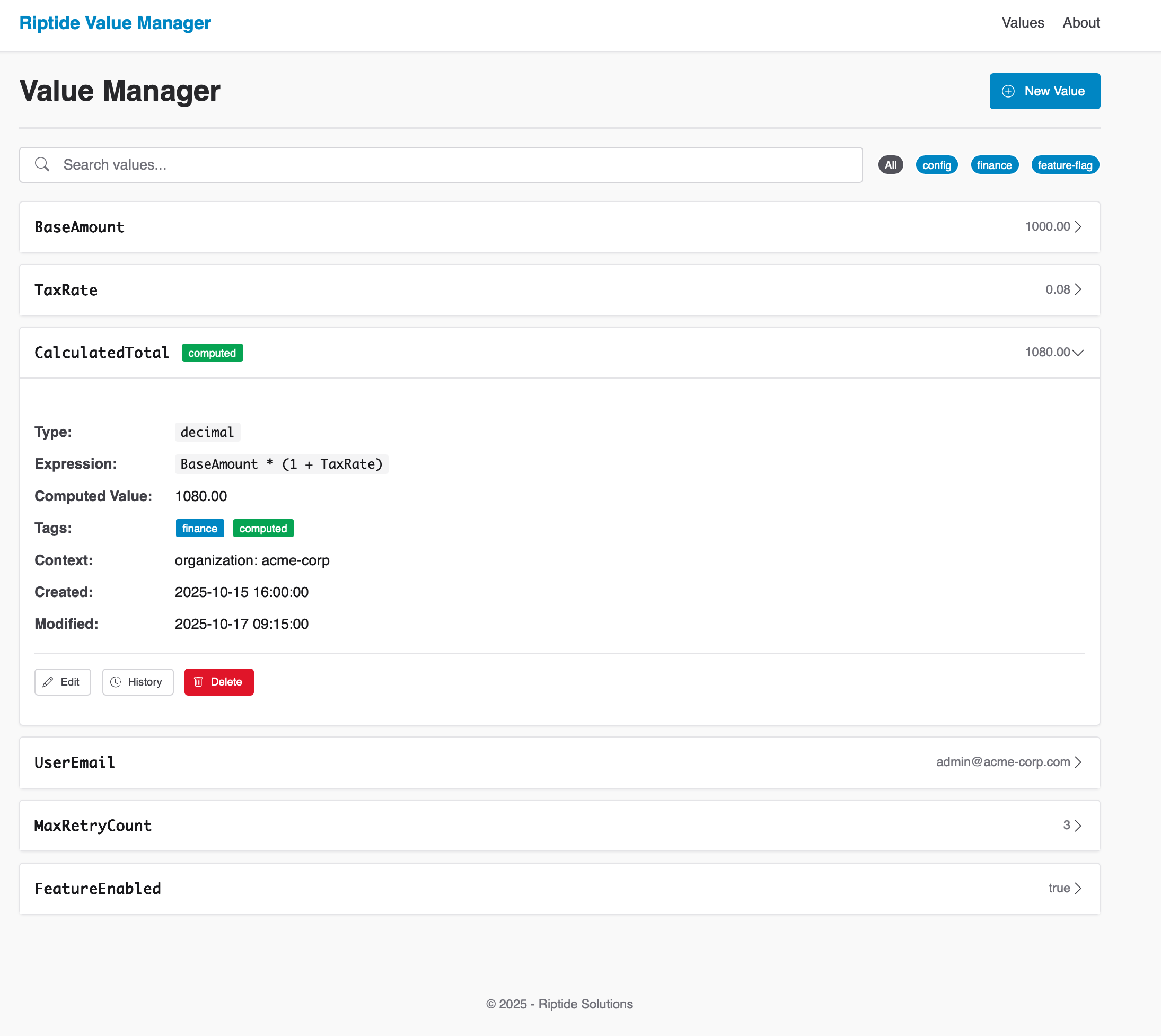
Overview
Riptide Value Manager is an enterprise-grade system for centralized management of typed variables used across business applications. It provides a business-user interface that enables non-technical users to update configuration values, business rules parameters, and application settings without code changes or developer intervention—dramatically reducing time-to-market for business logic adjustments and eliminating deployment risks for simple value changes.
Purpose
Modern enterprise applications require dynamic configuration without code deployments. Value Manager solves this by:
- Providing a central repository for all application variables
- Supporting different value types (strings, numbers, booleans, dates)
- Enabling business users to manage these values directly
- Supporting computed expressions for derived values
- Maintaining hierarchical context for value resolution
Why Riptide Value Manager
Empowers Business Users: Non-technical staff can update configuration values, business rules, and parameters directly through an intuitive interface—eliminating the bottleneck of waiting for developer availability and code deployments.
Accelerates Time-to-Market: Changes that previously required development sprints, code reviews, testing, and deployment cycles can now be made in minutes by the people who understand the business requirements best.
Reduces Risk: Simple value changes no longer require code deployments, eliminating the risk of deployment failures, rollback procedures, and production incidents for routine configuration updates.
Increases Developer Productivity: Developers focus on building features instead of making configuration changes, while business users maintain direct control over the parameters that drive application behavior.
Ensures Compliance: Complete audit trails track every change with user identity and timestamps. Optional workflow integration adds approval gates for sensitive changes, satisfying regulatory and governance requirements.
Delivers Enterprise Scale: Role-based access control, multi-tenant support, and hierarchical value resolution ensure the system scales from departmental use to enterprise-wide deployment while maintaining security and performance.
Key Capabilities
- Strongly-typed Values: Define string, number, boolean, or datetime values with comprehensive validation and automatic type conversion
- Enterprise Expression Engine: Roslyn-based C# scripting enables sophisticated calculated values with full .NET language capabilities—arithmetic, conditional logic, string manipulation, and Math functions
- Context-aware Resolution: Values automatically resolve with hierarchical fallback (user → project → organization → global) for precise, scalable configuration
- Hierarchical Fallback: Intelligent resolution engine automatically finds the most specific value for any context while preventing infinite recursion
- Complete Audit Trail: Comprehensive change tracking with user identity, timestamps, and value history for regulatory compliance
- Capability-Based Access Control: Advanced authorization system with fine-grained permissions and Riptide Identity integration
- Excel Import/Export: Full-featured bulk operations with validation and error reporting for business-user workflow integration
Expression System
Riptide Value Manager supports computed values through a powerful expression system powered by Microsoft Roslyn. This allows you to define values that are dynamically calculated based on other values, constants, or mathematical operations using full C# syntax.
Basic Syntax
Expressions use C#-based syntax through Roslyn scripting. Reference other values using the Values.PropertyName format:
// Reference another value
Values.BaseAmount

// Simple arithmetic
Values.BaseAmount * 0.2

// Multiple value references
Values.BaseAmount * Values.TaxRate
Value References
To reference another value in the system:
- Use the
Values.prefix followed by the exact name of the value - Names are case-sensitive in expressions (use exactly as shown in the UI)
- The system will resolve the referenced value based on the current context
Supported Operations
Arithmetic Operations
Values.BaseAmount + Values.AdditionalFee  // Addition
Values.BaseAmount - Values.Discount       // Subtraction
Values.BaseAmount * Values.Multiplier     // Multiplication
Values.BaseAmount / Values.Divisor        // Division
Math.Pow(Values.BaseAmount, 2)            // Exponentiation
Comparison Operations
Values.Amount > Values.Threshold           // Greater than
Values.Amount >= Values.Threshold          // Greater than or equal
Values.Amount < Values.Threshold           // Less than
Values.Amount <= Values.Threshold          // Less than or equal
Values.Amount == Values.ExpectedValue      // Equal to
Values.Amount != Values.ExpectedValue      // Not equal to
Conditional Expressions
Values.Amount > 1000 ? Values.HighTier : Values.LowTier // Ternary conditional
Math Functions
Math.Round(Values.Amount, 2)               // Round to 2 decimal places
Math.Ceiling(Values.Amount)                // Round up to nearest integer
Math.Floor(Values.Amount)                  // Round down to nearest integer
Math.Abs(Values.Amount)                    // Absolute value
Math.Min(Values.Amount1, Values.Amount2)   // Minimum of two values
Math.Max(Values.Amount1, Values.Amount2)   // Maximum of two values
String Operations
Values.Prefix + " " + Values.Suffix        // String concatenation
Values.Text.ToUpper()                      // Convert to uppercase
Values.Text.ToLower()                      // Convert to lowercase
Values.Text.Substring(0, 5)                // Get first 5 characters
Values.Text.Replace("old", "new")          // Replace text
Values.Text.Contains("search")             // Check if contains text
DateTime Operations
Values.StartDate.AddDays(Values.DayCount)     // Date arithmetic
Values.StartDate.AddMonths(Values.MonthCount)
Values.Date.Year                              // Date parts
Values.Date.Month
Values.Date.Day
(Values.EndDate - Values.StartDate).TotalDays // Date differences
Expression Examples
Tiered Pricing Calculation
Values.Quantity < 10 ? Values.BasePrice :
Values.Quantity < 50 ? Values.BasePrice * 0.9 :
Values.BasePrice * 0.8
Tax Calculation with Rounding
Math.Round(Values.SubTotal * Values.TaxRate, 2)
Date-based Promotion
DateTime.Now >= Values.PromotionStart && DateTime.Now <= Values.PromotionEnd ?
    Values.DiscountedPrice : Values.RegularPrice
Best Practices & Limitations
Best Practices:
- Keep expressions simple and avoid deep nesting
- Use parentheses for clarity in complex expressions
- Check for division by zero:
Values.Divisor != 0 ? Values.Amount / Values.Divisor : 0 - Follow descriptive naming conventions for referenced values
Limitations:
- Maximum recursion depth to prevent infinite loops
- Complex expressions with many value references may impact performance
- Not all C# language features are supported in expressions
Integration Points
- Comprehensive REST API: Full CRUD operations with OpenAPI documentation, JWT authentication, and API key support for read-only access
- High-Performance Resolver: Asynchronous value resolution with intelligent caching and context-aware lookups
- .NET SDK: Strongly-typed client library with async/await patterns and comprehensive error handling
- Riptide Identity Integration: Seamless authentication with capability-based authorization and role management
- Excel Integration: Native import/export with validation, error reporting, and business-user-friendly formatting
- Modern Web Interface: Responsive design with inline editing, real-time validation, and mobile-responsive access
Common Use Cases
- Feature Flags: Toggle features on/off without code deployments
- Business Rules: Store thresholds, rates, and parameters for rule engines
- Content Personalization: Store segments, targeting criteria, and content variants
- Workflow Configuration: Define process parameters and transition conditions
- Prompt Engineering: Store reusable components for LLM prompt construction

Overview
Riptide Rules is a production-ready, enterprise-grade business rules engine that enables organizations to define, manage, and evaluate complex business rules dynamically at runtime. It empowers business users to modify application behavior without requiring code changes, deployments, or developer intervention. Built on .NET with clean architecture principles and comprehensive security measures, it serves applications in any technology stack through REST APIs, while providing native .NET integration for optimal performance.
As part of the Riptide Platform, Rules integrates seamlessly with other platform components, particularly Riptide Value Manager, to create a powerful ecosystem for dynamic business logic management.
Purpose
Traditional application development embeds business logic directly into code, requiring developer involvement for every change. Riptide Rules solves this by:
- Separating business rules from application code
- Providing a user-friendly interface for business users to manage rules
- Supporting complex rule conditions including nested properties and collections
- Evaluating rules in real-time against domain objects
- Enabling prioritized rule execution with early termination
Why Choose Riptide Rules
Business Benefits
- Unprecedented Agility: Adapt business logic in minutes, not months, without development cycles or deployments
- Empowered Business Users: Non-technical users can create and modify complex business rules through intuitive interfaces
- Enterprise Consistency: Single source of truth for all business rules with centralized management and governance
- Regulatory Compliance: Complete audit trail, change tracking, and approval workflows for regulated industries
Technical Excellence
- Production-Ready Architecture: Clean architecture, comprehensive testing (100% test coverage), and enterprise security measures
- High Performance: Optimized for high-throughput scenarios with async operations, caching, and concurrent execution
- Developer-Friendly: Rich .NET SDK, comprehensive API documentation, and extensive tooling for seamless integration
- Operational Maturity: Advanced CLI tools, monitoring capabilities, and deployment automation for DevOps excellence
Key Capabilities
- Advanced Rule Evaluation Engine: Execute rules against any data structure at runtime via REST API or native .NET objects with generic type support and high-performance async operations
- Sophisticated Expression System: Full Dynamic LINQ support with nested property access, complex collection operations, and advanced filtering capabilities
- Intelligent Execution Control: Rules evaluated in priority order with configurable early termination and context-aware grouping
- Enterprise Data Management: Database-driven architecture with Entity Framework Core, extensible storage providers, and robust transaction support
- Comprehensive Security Framework: Multi-layer validation with syntax checking, security scanning, and documented vulnerability mitigation strategies
- Production-Grade API Suite: RESTful endpoints with OpenAPI documentation, authentication, rate limiting, and comprehensive error handling
- Advanced Administrative Tools: Web-based Admin UI with card-based interface, comprehensive CLI management script, and automated deployment capabilities
- Seamless Platform Integration: Native integration with Riptide Value Manager for dynamic threshold management and cross-service orchestration
- Enterprise Monitoring & Auditing: Database-backed execution logging, performance monitoring, compliance tracking, and detailed audit trails
Advanced Expression System
Riptide Rules features a sophisticated expression evaluation engine built on Dynamic LINQ with enterprise-grade security measures:
Core Expression Types
- Boolean Logic: Complex conditional expressions (
Amount > 100 && Status == "Active") - String Operations: Advanced text processing (
Customer.Name.StartsWith("VIP") || Customer.Email.Contains("@enterprise.com")) - Collection Analytics: Powerful aggregation and filtering (
Orders.Where(o => o.Status == "Completed").Sum(o => o.Amount) >= Values.VipThreshold) - Deep Property Navigation: Multi-level object traversal (
Customer.Address.Region.Country.TaxRate > 0.15) - Mathematical Calculations: Complex financial formulas (
(GrossIncome - Deductions) * TaxRate >= MinimumTax)
Platform Integration Features
- Dynamic Value References: Seamless integration with Riptide Value Manager (
Amount >= Values.MinimumOrderAmount) - Cross-Context Evaluation: Rules can reference values managed by other platform components
- Real-Time Synchronization: Automatic cache invalidation when referenced values change
- Contextual Value Resolution: Environment-specific and tenant-specific value resolution
Security & Validation
- Expression Sanitization: Comprehensive validation to prevent code injection attacks
- Execution Sandboxing: Controlled evaluation environment with resource limits
- Audit Trail Integration: Every expression evaluation is logged for security analysis
Comprehensive Integration Architecture
Native Platform Integrations
- Riptide Value Manager Synergy: Native integration for dynamic threshold management, enabling rules to reference centrally managed values that can be updated without rule modification
- Riptide Identity Security: Leverages platform identity services for secure API key management and user authentication
- Cross-Platform Communication: Standardized REST APIs enable seamless integration across all Riptide Platform components
Universal Integration Capabilities
Multi-Technology Support
- Universal REST API: Production-grade endpoints serve applications in any technology stack (Python, Java, Node.js, PHP, Ruby, Go, React, Angular, Vue.js, etc.) with OpenAPI documentation, authentication, rate limiting, and comprehensive error handling
- Native .NET SDK: Type-safe library with generic support, async operations, and comprehensive exception handling for optimal .NET integration performance
- Mobile & Cross-Platform: Native support for iOS, Android, React Native, Flutter, and any mobile framework through REST API integration
- Microservices & Legacy: Perfect fit for containerized microservices environments and legacy system modernization without technology stack changes
Administrative & Management Tools
- Advanced CLI Tooling: Sophisticated command-line interface with 20+ management commands including service lifecycle, database operations, key management, and automated deployment
- Modern Admin UI: Responsive web interface with card-based layout, real-time updates, and comprehensive rule management capabilities
- Database Flexibility: Support for SQLite, SQL Server, PostgreSQL, and other Entity Framework providers
- Authentication Systems: API key authentication for services, integrated user management for Admin UI
Enterprise & Cloud Integration
- Container & Cloud Ready: Docker support, cloud-native deployment patterns, and environment-specific configuration management
- Monitoring & Observability: Integration with logging frameworks, performance monitoring, and audit systems
- DevOps Integration: CI/CD pipeline support, automated testing, and deployment automation capabilities
Common Use Cases Across All Technology Stacks
- E-Commerce Platforms: Order validation, shipping eligibility, and discount rules for web stores built in any technology (React, Angular, Vue.js, PHP, Python Django, Ruby on Rails, etc.)
- Financial Services: Loan approval, credit scoring, and risk assessment rules serving mobile apps, web applications, and backend services regardless of technology
- Fraud Detection Systems: Real-time transaction analysis rules accessible from Python ML pipelines, Java services, Node.js APIs, or any language
- Regulatory Compliance: Dynamic compliance rules that can be updated instantly across multi-language enterprise ecosystems
- Mobile Applications: Business logic rules serving native iOS/Android apps, React Native, Flutter, or hybrid mobile solutions
- Microservices Architecture: Centralized business rules serving diverse microservices written in Go, Java, Python, Node.js, .NET, or other technologies
- Legacy System Modernization: Add dynamic business rules to COBOL, mainframe, or legacy systems without technology migration
- IoT & Edge Computing: Rules evaluation for device management, sensor data processing, and automated decision-making
- Multi-Tenant SaaS: Context-aware rules that adapt behavior based on tenant configurations across any application technology
Riptide Platform Synergy: Rules + Value Manager
While Riptide Rules operates independently, combining it with Riptide Value Manager creates a powerful ecosystem for dynamic business logic management:
Unified Threshold Management
- Dynamic Rule Parameters: Rules reference centrally managed values (
Amount >= Values.VipThreshold) that can be updated instantly across all applications - Environment Consistency: Value Manager ensures consistent thresholds across development, staging, and production environments
- Real-Time Updates: Change a threshold in Value Manager and all related rules immediately use the new value without rule modification
Advanced Business Scenarios
- Seasonal Pricing: Rules reference seasonal discount rates managed in Value Manager, enabling automatic price adjustments
- Risk Management: Fraud detection rules reference dynamic risk thresholds that can be adjusted based on current threat levels
- Compliance Adaptation: Regulatory rules reference compliance limits that can be updated as regulations change
- A/B Testing: Rules can reference experimental values to enable controlled feature rollouts and testing
Operational Excellence
- Centralized Configuration: Business users manage both rules and values through integrated interfaces
- Coordinated Updates: Changes to values automatically trigger rule re-evaluation notifications
- Cross-Component Auditing: Complete audit trail across both rules execution and value changes
- Performance Optimization: Intelligent caching ensures high-performance evaluation even with frequently changing values
Real-World Integration Examples
E-Commerce Dynamic Pricing (from any application stack):
// REST API Call from Node.js, Python, PHP, Java, etc.
POST /api/rules/evaluation/evaluate-context
{
  "context": "shipping-rules",
  "target": {
    "Order": { "Amount": 85.00 },
    "Customer": { "Status": "VIP" }
  }
}
// Rule: VIP Customer Free Shipping
// Condition: Order.Amount >= Values.VipFreeShippingThreshold && Customer.Status == "VIP"
// Value Manager: VipFreeShippingThreshold = $75 (adjustable seasonally)
Financial Risk Assessment:
// Rule: High-Risk Transaction Alert
// Condition: Transaction.Amount > Values.HighRiskLimit && Customer.RiskScore > Values.RiskThreshold
// Value Manager: HighRiskLimit and RiskThreshold can be adjusted based on market conditions
Regulatory Compliance:
// Rule: Tax Calculation Compliance
// Condition: Order.TaxAmount >= Order.Subtotal * Values.MinimumTaxRate
// Value Manager: MinimumTaxRate updated automatically when tax regulations change
Production Readiness & Quality Assurance
Riptide Rules has undergone extensive testing and validation to ensure enterprise-grade reliability:
- Comprehensive Test Coverage: 100% test success rate across 100+ behavioral tests covering rule management, evaluation, API functionality, security, and Admin UI operations
- Behavior-Driven Development: Complete BDD test suite ensuring all features work exactly as specified for business users
- Security Hardened: Documented security considerations with implemented mitigation strategies for dynamic expression evaluation
- Performance Validated: Load testing and optimization for high-throughput evaluation scenarios
- Production Deployment: Successfully deployed and operating in enterprise environments with comprehensive monitoring and logging
x
Overview
Riptide Fee Management is an enterprise-grade fee calculation and distribution service. It provides centralized fee structure management, dynamic calculation engines, multi-party distribution logic, and comprehensive audit trails—enabling agencies to maintain accurate, compliant, and transparent fee processing across their service portfolio.
Why Riptide Fee Management
- Regulatory Compliance: Maintain accurate historical fee records for audits and legal requirements
- Operational Efficiency: Centralize fee management across all services
- Financial Accuracy: Eliminate calculation errors with tested, version-controlled fee structures
- Rapid Deployment: Launch new services without custom fee calculation code
- Transparency: Complete audit trails for every fee calculation and distribution
- Scalability: Handle high-volume transaction processing with horizontal scaling
- Integration Ready: Native workflow integration and SDK support for seamless adoption
- Multi-Tenant: Complete tenant isolation for shared platform deployments
Purpose
Traditional fee management embeds calculation logic directly into application code, creating maintenance nightmares when fee structures change, regulations evolve, or new services launch. Riptide Fee Management solves this by:
- Centralizing all fee structures in a single, version-controlled repository
- Supporting historical fee lookups for retroactive calculations and compliance audits
- Enabling formula-based calculations that reference other fees and business context
- Automating multi-party distributions with configurable accounting codes
- Providing workflow integration for seamless fee calculation within business processes
- Generating comprehensive audit trails for regulatory reporting and reconciliation
Key Capabilities
- Dynamic Fee Calculation: Execute fee calculations using fixed amounts, formulas, tiered structures, or percentages
- Historical Fee Support: Calculate fees using structures effective on any past date for retroactive processing
- Multi-Party Distributions: Automatically split fees across multiple accounting codes with percentage or fixed-amount rules
- Tenant Isolation: Complete data separation for multi-tenant government platforms
- Workflow Integration: Native integration with Riptide Platform workflow engine for automated fee processing
- Formula Engine: Support complex calculations referencing other fees, context variables, and conditional logic
- Comprehensive Audit Trail: Track every calculation with full context for compliance and reconciliation
- Performance Optimized: Designed for ≥2000 calculations per minute with sub-500ms P95 latency
Fee Calculation System
Riptide Fee Management supports multiple calculation methods to accommodate diverse business requirements:
- Fixed Amount: Simple flat fees (
$100.00) - Formula-Based: Dynamic calculations (
base_amount + (expedited ? expedited_fee : 0)) - Tiered Structures: Range-based fees (e.g., entity value tiers)
- Percentage Calculations: Proportional fees based on transaction amounts
- Historical Calculations: Use fee structures effective on specific dates
- Distribution Rules: Automatic splitting across accounting codes with priority ordering
Integration Points
- REST API: Calculate fees and manage structures from any application via HTTP endpoints
- Workflow Engine Integration: Automated fee calculation steps within Riptide Platform workflows
- Platform SDK Foundation: Built on Riptide Platform SDK components (Logging, Configuration, Monitoring, Tenant Isolation)
- Caching Layer: High-performance in-memory caching for frequently accessed fee structures
- Configurable Persistence: Entity Framework Core with pluggable database providers (SQL Server, PostgreSQL, others)
- Observability: OpenTelemetry distributed tracing via Platform Monitoring SDK
Common Use Cases
- Document Filing Fees: Calculate fees for business entity filings, amendments, and renewals with historical accuracy
- Multi-Party Collections: Split filing fees across state agencies, processing entities, and fund accounts
- Service Request Fees: Dynamic fee calculation for expedited processing, research requests, and premium services
- Compliance Fee Structures: Maintain historical fee structures for audit compliance and retroactive calculations
- Fee Reconciliation: Generate detailed breakdowns for financial reconciliation and reporting
- Regulatory Fee Changes: Deploy new fee structures with effective dates without code changes or downtime
Overview
The Riptide Workflow Orchestration Engine is an enterprise-grade platform designed for automated document processing, AI-powered data extraction, and complex business process automation. Built on clean architecture principles with asynchronous execution and distributed job processing, it supports thousands of concurrent workflow executions with horizontal scaling, comprehensive observability, and flexible integration with AI models and business systems.
Purpose
Modern document processing and business automation requires orchestrating complex interactions between file systems, databases, AI models, human reviewers, and notification systems. The Riptide Workflow Engine solves this by:
- Providing visual workflow design with JSON-based definitions that integrate seamlessly with the workflow-designer tool
- Supporting asynchronous execution at scale with reliable background job processing
- Abstracting AI model complexity through named interfaces that business users can reference without technical knowledge
- Enabling human-in-the-loop workflows with email-based task orchestration, work queues, and secure callbacks
- Integrating with diverse data sources through SQL query nodes, file download nodes, and PDF processing capabilities
- Maintaining complete execution history with automatic archival for performance and compliance
Key Capabilities
Visual workflow design — JSON-based definitions created in the workflow-designer tool and deployed via REST API. Nodes, edges, and execution logic are declared in a format that supports versioning, import/export, and pre-deployment validation.
AI model abstraction — Administrators configure named model interfaces (e.g. "Local Vision Model", "Claude Document Processing") that hide provider endpoints, API keys, and parameters. Workflow designers reference models by name.
Asynchronous execution — Distributed job processing with persistent storage, automatic retry, and priority queues. The API returns a tracking ID immediately while nodes execute in the background across horizontally scaled workers.
Human-in-the-loop tasks — Workflows pause for manual intervention via email notifications with secure callback links. Configurable work queues (Expedite, Same-Day, General, Finance, HR, etc.) carry assigned priorities, SLA deadlines, and team ownership.
Rich node library — SQL queries, Azure Blob and HTTP file downloads, PDF page extraction and merge, dynamic expression evaluation, JSON transforms, and multi-channel notifications (email, SMS, webhooks, Teams, Slack).
End-to-end observability — Every node execution is tracked with inputs, outputs, duration, and errors. Correlation IDs tie operations together across distributed systems, complemented by health checks, Prometheus metrics, and execution history APIs.
Why Riptide Workflow Engine
Ship process changes in hours, not weeks. Design workflows visually, test them, and deploy via API—no code changes required to modify process logic, update AI prompts, or adjust routing decisions.
Scale without rearchitecting. Horizontal worker scaling, distributed job processing, and automatic result archival sustain thousands of executions per day while keeping the database lean.
Swap AI providers freely. Named model interfaces decouple workflow logic from provider details. Move between Azure AI, OpenAI, Anthropic Claude, or self-hosted models (Ollama, vLLM) without touching workflow definitions.
Balance automation and accuracy. Confidence-based routing sends clear-cut results straight through and flags uncertain extractions for human review—keeping people in the loop only when their judgment matters.
Extend with clean abstractions. Pluggable node implementations, DynamicExpresso expression evaluation, and full Riptide SDK integration (identity, logging, configuration) let developers add custom capability without fighting the framework.
Workflow Orchestration System
The Riptide Workflow Engine supports sophisticated automation patterns.
SQL Query Nodes execute parameterized queries against business databases, supporting INSERT, UPDATE, DELETE, and SELECT operations with dynamic parameter binding from workflow context variables.
File Download Nodes retrieve documents from Azure Blob Storage, HTTP/HTTPS endpoints, and local file system paths with flexible authentication options. PDF Processing Nodes extract specific pages, split documents into individual pages, merge multiple PDFs, and extract metadata for downstream processing.
AI Extraction Nodes send documents or images to configured model interfaces with custom prompts and field definitions. The engine manages provider-specific request formats, authentication, rate limiting, and error handling—returning normalized results with confidence scores and extracted field values.
Decision Nodes evaluate dynamic expressions at runtime, routing workflows based on confidence scores, field values, business rules, or any condition expressible through the expression engine. Transform Nodes manipulate JSON data structures, mapping fields, aggregating values, and preparing data for subsequent nodes.
Human Task Nodes pause execution and generate email notifications with customizable templates, placeholder substitution for task details and due dates, and secure callback URLs. The engine validates callbacks, checks expiration against SLA deadlines, and resumes workflow execution when users complete tasks.
Notification Nodes send alerts via email, SMS, webhooks to external systems, and chat platforms including Microsoft Teams and Slack. Error handling supports automatic retry with configurable attempts, custom error routes in workflow definitions, and manual intervention when automatic recovery is exhausted.
Integration Points
Applications interact with the Workflow Engine through a REST API that creates workflow definitions, starts executions, queries instance status, retrieves execution history, manages human tasks, and cancels running workflows. The API supports import/export of workflow definitions from the visual workflow-designer tool for seamless deployment.
Configuration management uses a hybrid approach: workflows, work queues, and AI model interfaces can be seeded from configuration files on startup and then managed through admin APIs. This enables version-controlled configuration in development while supporting dynamic updates in production without redeployment.
Database architecture separates business data from workflow engine data. Business databases contain application-specific tables accessed via SQL Query Nodes, while the workflow engine database stores execution state, job queue data, human tasks, and configuration. This separation enables independent scaling and backup strategies.
Riptide SDK integration provides identity management for authentication and authorization, structured logging with correlation IDs, configuration management with environment-specific overrides, and health check patterns for monitoring. The engine leverages SDK abstractions for consistent behavior across the Riptide platform.
Container deployment supports containerization with flexible migration strategies, health check endpoints for orchestration integration, metrics export, and horizontal scaling through multiple worker instances sharing a common database.
Scheduled execution supports recurring workflows with flexible scheduling, one-time scheduled executions with start date/time, and timezone-aware scheduling across multiple regions.
Event-driven triggers can initiate workflows from external systems via webhook endpoints with configurable authentication.
Common Use Cases
Organizations use the Riptide Workflow Engine to automate document-intensive and AI-powered business processes.
PDF document processing workflows download documents from storage, extract specific pages, send images to AI models for stamp detection and field extraction, route low-confidence results to human reviewers in work queues, and save validated data to business databases—all without manual intervention until human judgment is required.
AI-powered data extraction handles forms, invoices, contracts, and government documents by routing images through appropriate AI models, validating confidence scores through decision nodes, and escalating uncertain extractions to work queues with appropriate SLAs and team assignments.
Multi-stage review workflows coordinate document intake, automated field extraction via AI, confidence-based routing to expedite or standard review queues, parallel review when multiple approvals are required, and final disposition with notification to stakeholders—maintaining complete audit trails for compliance and quality assurance.
Scheduled batch processing runs nightly workflows to process accumulated documents, calculate fees based on extracted data, update business databases with processing results, archive completed workflows automatically, and send summary notifications to operations teams—enabling lights-out processing at enterprise scale.
Human-in-the-loop automation blends AI extraction with human verification by sending documents to AI models first, evaluating confidence scores to determine when human review is needed, routing tasks to appropriate work queues based on document type or priority, and resuming automated processing after human validation—achieving optimal balance between automation and accuracy.
Cross-system orchestration coordinates activities across document storage, AI providers, business databases, email systems, and chat platforms—breaking down integration complexity through declarative workflow definitions and unified execution monitoring.
The top of the stack is where your applications live — Riptide products, your custom-built applications, and third-party integrations, all operating as peers within the platform.
Every application shares the same foundation, the same identity layer, and the same business logic services. Custom apps register with Application Manager and become first-class citizens.